Blog Proving Your Kafka Migration Worked
By Pinakin Parkhe / 28 Jul 2026 / Topics: Cloud , Migration

Key takeaways
- Green dashboards don’t guarantee data integrity: Having active replication pipelines and green telemetry signals does not prove that your core business data is safe. To achieve true proven performance, you must rigorously validate that every message replicates flawlessly before hitting the throttle on your cutover.
- Move past raw counts with baselines and hashes: Simple message count comparisons fail due to varied retention cycles and offset mismatches. To mathematically guarantee zero data loss, you must use MM2 sync records to establish a clear baseline and perform byte-for-byte SHA-256 hash spot checks.
- Measure lag, not offsets, for consumer continuity: Because source and target offset numbers will look completely different, evaluating consumer group readiness requires comparing the actual lag. Validating that the lag is zero on both clusters ensures that downstream applications will seamlessly resume exactly where they left off.
- Execute a zero-failure cutover sequence: Safely migrating production traffic requires a highly disciplined, multi-step sequence. By methodically pausing connectors, verifying a zero replication gap, resetting necessary offsets, and capturing final snapshots, you can execute a flawless infrastructure exit with minimal business disruption.
This is Part Three of a three-part series on migrating Apache Kafka between cloud providers using MirrorMaker 2. In Part One, we covered Kafka internals. In Part Two, we set up and configured MM2. In this final post, we cover the hardest part: How do you prove it worked, and how do you actually flip the switch?
The systems are live. Topics are replicating. Your replication pipelines are running, telemetry signals are pulsing, and the engineering dashboards are green.
However, from a business risk perspective, operational visibility is not the same as data integrity. Green dashboards do not guarantee that your core business data is safe, nor do they prove that your downstream applications will seamlessly resume operations after the transition.
The problem
You have a production Kafka cluster that needs to move to a different cloud. Zero message loss. Consumer groups must resume at the exact right position. Compacted topics must arrive intact. In Part One, we covered Kafka’s architecture and why migration is hard. In Part Two, we set up MirrorMaker 2 (MM2) — the replication engine, the configuration, and production traps to watch out for.
MM2 is now running. Topics are replicating. Heartbeats are flowing. The dashboard looks green. But here’s the thing: None of that proves it actually worked.
How do you know every message made it across? How do you confirm the data on the target matches the source, byte for byte? How do you verify consumer groups will resume at the right position, not skip messages, and not reprocess? And for compacted topics, how do you prove every key has the correct latest value?
This post covers the hardest part of the migration: proving it worked, and then actually flipping the switch.
Before you cut over production traffic, you need to answer four questions with certainty:
- Has every message since MM2 started been replicated?
- Does the data on the target actually match the source, byte for byte?
- Will consumers resume at the correct position on the target?
- For compacted topics, does every key have the same latest value?
We built a validation framework to answer all four questions. This post walks through the approach, the math, and the implementation patterns with enough detail that you could build your own version for your migration.
Part A: Count validation — The baseline approach
Why simple counts don’t work

The naive approach is to compare total message counts when you’re replicating from latest: Calculate latest - earliest for each partition on both clusters and check if they match. This fails immediately.
The source cluster has been running for years. Offsets might be in the billions. The target started from zero. You used auto.offset.reset = latest, so MM2 only replicates new messages going forward, not the entire history. Furthermore, retention runs independently on each cluster; even if both have seven-day retention, they started at different times with different data.
It’s also worth understanding how retention actually works in Kafka, because it’s not as simple as “seven days = deleted after seven days.” Kafka stores messages in log segments: files on disk that hold a batch of messages. Each partition has one active segment (the one currently being written to) and zero or more closed segments (older ones that are full). Retention only applies to closed segments, never the active one. A segment gets closed when it reaches a configured size (log.segment.bytes, default 1GB) or age (log.segment.ms).
So when you set retention.ms = 604800000 (seven days), what actually happens is this: Kafka periodically runs a log cleanup process that checks each closed segment’s timestamp. If the newest message in a closed segment is older than seven days, the entire segment becomes eligible for deletion — but it’s not deleted immediately. It gets cleaned up the next time the log cleaner runs. The active segment is never touched, regardless of how old its messages are.
This means two clusters with identical retention settings will almost certainly have different message counts at any given time. Their segments close at different times, their log cleaners run at different intervals, and their active segments hold different amounts of data. Comparing raw counts between clusters is meaningless.
Bottom line: The calculation source_latest - source_earliest will never equal target_latest - target_earliest. And that’s perfectly fine — it doesn’t mean replication is broken.
The insight: Use a common reference point
Instead of comparing total counts, you need a baseline: The point in time when MM2 started replicating each partition. From that baseline forward, the counts must match.
MM2 already provides this reference point. Remember from Part Two: The MirrorSourceConnector writes offset mapping records to the mm2-offset-syncs.<target>.internal topic on the source cluster. Each record says:
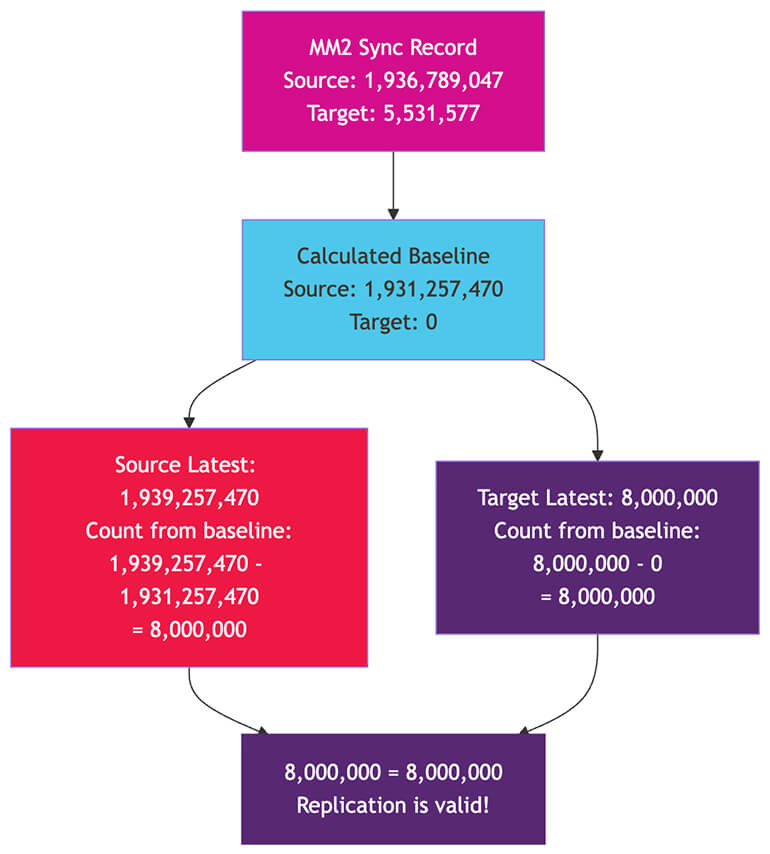
OffsetSync{topicPartition=user-events-0, upstreamOffset=1936789047, downstreamOffset=5531577}
This tells you: Source offset 1,936,789,047 corresponds to target offset 5,531,577 for partition zero of user-events. This is your baseline anchor.
The baseline math
From a sync record, you can calculate which source offset corresponds to target offset zero:
calculated_baseline_source = sync_source_offset - sync_target_offset
                           = 1,936,789,047 - 5,531,577
                           = 1,931,257,470
This means: Source offset 1,931,257,470 is where target offset zero begins. Every message from that point forward should exist on both clusters.
Now the validation formula is simple:
source_count_from_baseline = source_latest - calculated_baseline_source
target_count_from_baseline = target_latest - calculated_baseline_target

If these two numbers are equal, replication is valid for that partition.
For example:
source_latest = 1,939,257,470
calculated_baseline_source = 1,931,257,470
source_count = 1,939,257,470 - 1,931,257,470 = 8,000,000

target_latest = 8,000,000
calculated_baseline_target = 0
target_count = 8,000,000 - 0 = 8,000,000

8,000,000 = 8,000,000
LHS = RHS
Hence proved.
(All Indian Math millennials with get this reference :P)
The absolute offset numbers are completely different, but the deltas match. That’s all that matters.
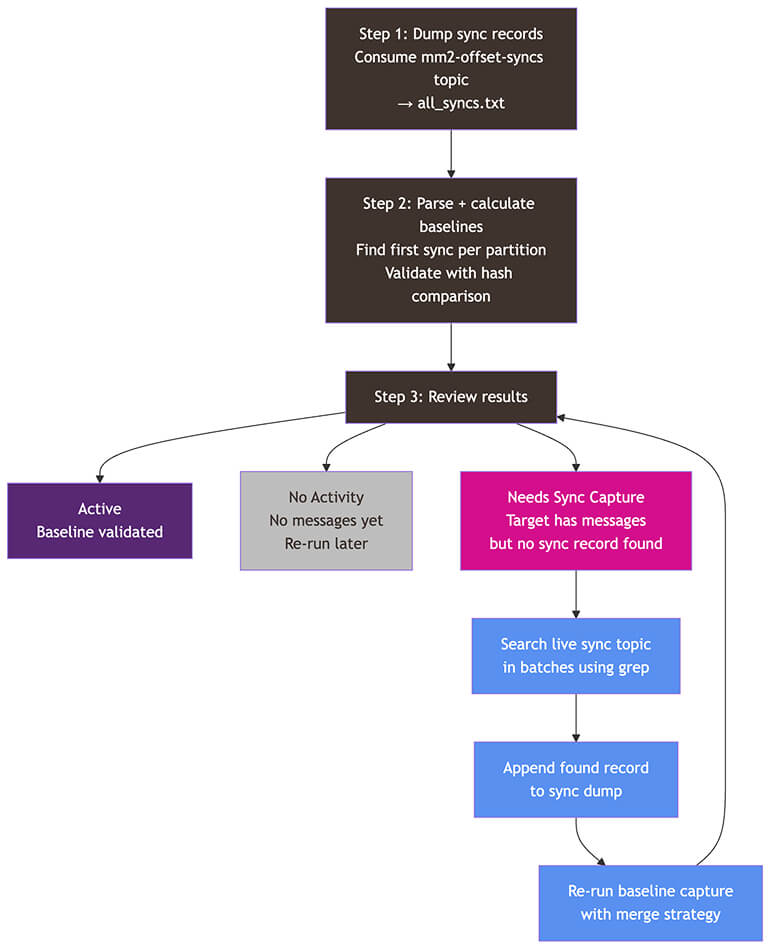
Step 1: Dump the sync records
First, consume the entire mm2-offset-syncs topic from the source cluster:
kafka-console-consumer.sh \
  --bootstrap-server <SOURCE_BOOTSTRAP> \
  --consumer.config consumer-ssl.properties \
  --topic mm2-offset-syncs.<target-alias>.internal \
  --from-beginning \
  --timeout-ms 50000 \
  --formatter 'org.apache.kafka.connect.mirror.formatters.OffsetSyncFormatter' \
  > all_syncs.txt 2>&1
The --timeout-ms 30000 setting makes the consumer exit after 30 seconds of no new messages, effectively consuming the entire topic. The formatter outputs human-readable sync records.
This file now contains every offset mapping MM2 has ever written. For a busy cluster, it could be millions of lines.
Step 2: Parse and find the first sync per partition
You need the first (earliest) sync record for each topic-partition. Here’s the core parsing logic in Python:
import re

def parse_sync_records(dump_path):
    """Parse sync dump file, keep first occurrence per topic-partition."""
    first_syncs = {}
    pattern = re.compile(
        r'OffsetSync\{topicPartition=(.+)-(\d+), '
        r'upstreamOffset=(\d+), downstreamOffset=(\d+)\}'
    )

    with open(dump_path, 'r') as f:
        for line in f:
            match = pattern.search(line)
            if match:
                topic = match.group(1)
                partition = int(match.group(2))
                source_offset = int(match.group(3))
                target_offset = int(match.group(4))

                # Only keep the first occurrence
                key = (topic, partition)
                if key not in first_syncs:
                    first_syncs[key] = {
                        'source_offset': source_offset,
                        'target_offset': target_offset
                    }

    return first_syncs
Step 3: Calculate baselines and validate with hashes
For each partition, calculate the baseline and then validate it by fetching the actual messages at both offsets and comparing their hashes:
import hashlib


def compute_hash(message):
    """Compute SHA-256 hash of a message."""
    if message is None:
        return None
    return hashlib.sha256(message.encode('utf-8')).hexdigest()


def calculate_baseline(sync_record, target_earliest):
    """
    Calculate what source offset corresponds to target_earliest.
    Usually target_earliest is 0, but could be higher if target
    has retention.
    """
    baseline_source = (sync_record['source_offset']
                       - sync_record['target_offset']
                       + target_earliest)
    baseline_target = target_earliest

    return {
        'source': baseline_source,
        'target': baseline_target
    }
To validate the baseline, fetch the message at baseline_source from the source cluster and the message at baseline_target from the target cluster, hash both, and compare. If the hashes match, your baseline is confirmed accurate.
def validate_baseline(source_bootstrap, target_bootstrap,
                      topic, partition,
                      source_offset, target_offset):
    """Fetch messages at both offsets and compare hashes."""

    source_msg = fetch_message_at_offset(
        source_bootstrap, topic, partition, source_offset
    )
    target_msg = fetch_message_at_offset(
        target_bootstrap, topic, partition, target_offset
    )

    source_hash = compute_hash(source_msg)
    target_hash = compute_hash(target_msg)

    if source_hash and target_hash:
        return source_hash == target_hash  # True = validated
    return None  # Can't validate (message deleted by retention)
The fetch_message_at_offset function wraps kafka-console-consumer.sh with --offset <OFFSET> --max-messages 1 to retrieve exactly one message.
Handling edge cases
Not every partition will have a sync record on the first run:
- No activity: The partition has had no messages, so MM2 never wrote a sync record. No action is needed — re-run the baseline capture later when messages start flowing.
- Needs sync capture: The target has messages, but no sync record was found in the dump. This means the sync record exists in the live topic but wasn’t captured in the dump — perhaps the dump didn’t go back far enough, or the record was written after the dump.
For the second case, you need to search the live sync topic. The approach is to consume backward from the latest offset in configurable batches, grepping for the specific topic-partition:
# Consume a batch of 1,000,000 messages starting from a specific offset
kafka-console-consumer.sh \
  --bootstrap-server <SOURCE_BOOTSTRAP> \
  --consumer.config consumer-ssl.properties \
  --topic mm2-offset-syncs.<target>.internal \
  --partition 0 \
  --offset <START_OFFSET> \
  --max-messages 1000000 \
  --formatter 'org.apache.kafka.connect.mirror.formatters.OffsetSyncFormatter' \
2>/dev/null | grep "topicPartition=user-events-42,"
Search batch by batch, moving backward from the latest offset, until you find the sync record. Append it to your dump file and re-run the baseline capture with a merge strategy that preserves existing baselines.
This is an iterative process. We’d run the baseline capture, check which partitions were still missing, hunt down the sync records, merge them in, and repeat until every active partition had a validated baseline.
Part B: Ongoing monitoring — Tracking the replication gap
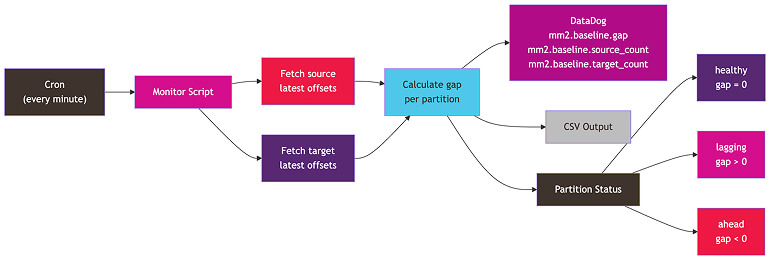
Once baselines are established, you need continuous visibility into replication health. The monitoring approach runs on a schedule — we used a cron job every minute — and does the following:
The monitoring logic
def monitor_partition(source_latest, target_latest, baseline):
    """Calculate replication gap for a single partition."""

    source_count = source_latest - baseline['source']
    target_count = target_latest - baseline['target']
    gap = source_count - target_count

    if gap == 0:
        status = 'healthy'
    elif gap > 0:
        status = 'lagging'  # Target behind source
    else:
        status = 'ahead'    # Should not happen; investigate

    return {
        'source_count': source_count,
        'target_count': target_count,
        'gap': gap,
        'status': status
    }
Fetching offsets in bulk
You don’t want to make a separate Kafka call for each partition. The kafka-get-offsets.sh tool can fetch offsets for all topics in a single call:
# Get latest offsets for ALL topics in one call
kafka-get-offsets.sh \
  --bootstrap-server <BOOTSTRAP> \
  --command-config consumer-ssl.properties \
  --time -1 # -1 for latest, -2 for earliest
Output appears as follows:
user-events:0:293802442
user-events:1:284715623
order-updates:0:15839201
...
Parse this into a dictionary of {topic: {partition: offset}}, and you have everything you need. Two calls total: one to the source, one to the target. You can compute gaps for every partition in the cluster.
Emitting metrics to DataDog
We sent three metrics per partition to DataDog via StatsD:
from datadog import statsd

def emit_metrics(topic, partition, result, tags):
    """Send replication metrics to DataDog."""
    metric_tags = tags + [
        f'topic:{topic}',
        f'partition:{partition}',
        f'status:{result["status"]}'
    ]

    statsd.gauge('mm2.baseline.source_count',
                 result['source_count'], tags=metric_tags)
    statsd.gauge('mm2.baseline.target_count',
                 result['target_count'], tags=metric_tags)
    statsd.gauge('mm2.baseline.gap',
                 result['gap'], tags=metric_tags)
Plus topic-level aggregates: Total gap across all partitions, the number of lagging partitions, and a flag indicating whether any partition needs a baseline. All of these are tagged with environment, region, topic, and partition.
This feeds into Datadog dashboards. We set up alerts so that if any partition’s gap stays above zero for more than a few minutes, we’d get notified.
The cron job
* * * * * python3 /path/to/monitor.py \
  --config config.yaml \
  --metadata topic_metadata.json \
  --baseline baseline.json \
  --log-file logs/monitor.log \
  --output-csv baseline_status.csv \
  --all --quiet 2>&1
Every minute, the monitor fetches offsets, computes gaps, emits metrics, and writes a CSV for manual review. The --quiet flag suppresses per-partition logging and only outputs topics, summaries, and issues.
Part C: Spot check validation — Proving data integrity

Count validation tells you the right number of messages arrived, but numbers can lie. What if MM2 replicated the wrong data? Spot-check validation proves the actual content matches — byte for byte.
The approach
For each partition:
- Pick multiple offsets to check — we used two per partition.
- Check 1: A message near the beginning of the replicated range
- Check 2: A message 99% of the way to the
latestoffset — near the end - For each check, translate the target offset to its corresponding source offset
- Fetch the message from both clusters at their respective offsets
- Compute hashes and compare.
Offset translation
The key formula for translating between source and target offsets:
def translate_target_to_source(target_offset, baseline):
    """Given a target offset, find the corresponding source offset."""
    return baseline['source'] + (target_offset - baseline['target'])
This works because the offset mapping is linear. The difference between source and target offsets is constant for a partition (it's just the baseline gap).
The spot check logic
def spot_check_partition(source_bootstrap, target_bootstrap,
                         topic, partition, baseline,
                         target_latest, num_checks=2, threshold_pct=99):
    """Run spot checks at multiple offsets for a partition."""

    results = []
    target_range = target_latest - baseline['target']

    if target_range <= 0:
        return []  # No messages since baseline

    # Calculate check offsets
    check_offsets = []

    # Check 1: Near the beginning (fallback to earliest if baseline
    # offset deleted by retention)
    check_offsets.append(baseline['target'])

    # Check 2: At threshold_pct% of the way to latest
    pct_offset = baseline['target'] + int(target_range * threshold_pct / 100)
    check_offsets.append(pct_offset)

    for target_offset in check_offsets:
        source_offset = translate_target_to_source(target_offset, baseline)

        # Fetch messages
        source_msg = fetch_message_at_offset(
            source_bootstrap, topic, partition, source_offset
        )
        target_msg = fetch_message_at_offset(
            target_bootstrap, topic, partition, target_offset
        )

        # Compare hashes
        source_hash = compute_hash(source_msg)
        target_hash = compute_hash(target_msg)

        match = (source_hash == target_hash) if (source_hash and target_hash) else None

        results.append({
            'source_offset': source_offset,
            'target_offset': target_offset,
            'source_hash': source_hash,
            'target_hash': target_hash,
            'match': match
        })

    return results
Handling retention
If the baseline offset has been deleted by retention on the source — meaning the message no longer exists — the spot check falls back to the source’s earliest available offset and adjusts the target offset accordingly:
def fallback_to_earliest(source_earliest, baseline):
    """When baseline offset is deleted, use earliest available."""
    adjusted_target = baseline['target'] + (source_earliest - baseline['source'])
    return source_earliest, adjusted_target
Running at scale
For a cluster with hundreds of partitions, the full spot check takes time. Each check involves two kafka-console-consumer.sh calls: One to the source, one to the target. With two checks per partition across more than 500 partitions, that's more than 2,000 Kafka consumer invocations. Budget more than two hours for a full run.
Run it with nohup so it survives SSH disconnections:
nohup python3 spot_check.py \
  --config config.yaml \
  --baseline baseline.json \
  --all \
  --spot-checks 2 \
  --threshold 99 \
  --output-csv spot_check_results.csv > /dev/null 2>&1 &

tail -f logs/spot_check.log
Part D: Compacted topic validation — The key-by-key approach
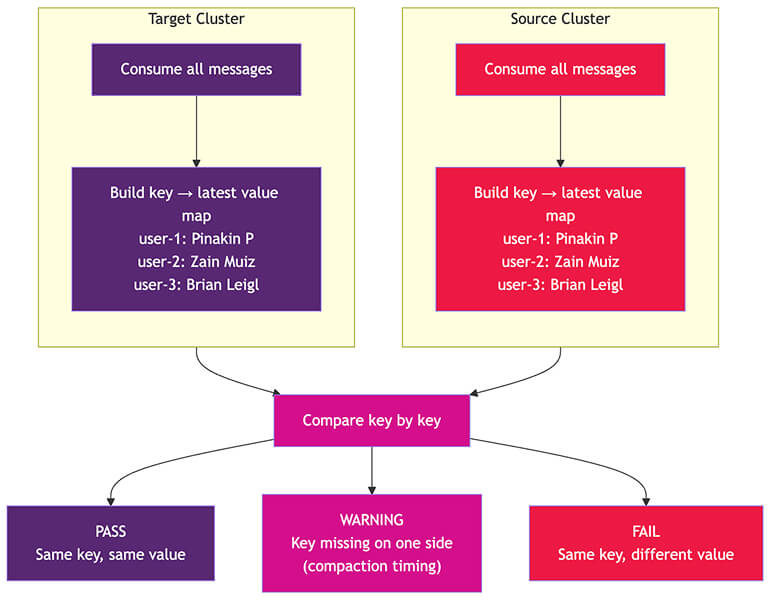
As we discussed in Part One, compacted topics can't be validated using offset math. Compaction runs independently on each cluster, removing old values for the same key at different times. The message counts will differ — and that's expected.
What matters for compacted topics is this: For every key on the source, does the target have the same latest value?
The approach
- Consume all messages from the topic on the source cluster — since it's a compacted topic, the message volume should be lower.
- Consume all messages from the topic on the target cluster — since it's a compacted topic, the message volume should be lower.
- For each side, build a map of
key→latestvalue — keeping only the most recent message per key, based on the offset within each partition.
Consuming all messages from a compacted topic
kafka-console-consumer.sh \
  --bootstrap-server <BOOTSTRAP> \
  --consumer.config consumer-ssl.properties \
  --topic <COMPACTED_TOPIC> \
  --from-beginning \
  --property print.key=true \
  --property key.separator="|" \
  --property print.partition=true \
  --property print.offset=true \
  --timeout-ms 30000
The --timeout-ms 30000 setting makes it exit after 30 seconds of silence — meaning all messages are consumed. The output includes the key, value, partition, and offset for each message.
Building the latest-value map
from collections import defaultdict

def build_latest_value_map(messages):
    """
    From a list of (key, value, partition, offset) tuples,
    build a map of key -> latest value.

    'Latest' means highest offset within each partition.
    For keys that appear across multiple partitions,
    keep the one with the highest offset overall.
    """
    latest = {}  # key -> {value, partition, offset}

    for key, value, partition, offset in messages:
        if key not in latest or offset > latest[key]['offset']:
            latest[key] = {
                'value': value,
                'partition': partition,
                'offset': offset
            }

    return latest
Comparing the maps
def compare_compacted_maps(source_map, target_map):
    """Compare key-value maps from source and target."""

    source_keys = set(source_map.keys())
    target_keys = set(target_map.keys())

    common_keys = source_keys & target_keys
    only_source = source_keys - target_keys
    only_target = target_keys - source_keys

    matching = 0
    mismatched = []

    for key in common_keys:
        if source_map[key]['value'] == target_map[key]['value']:
            matching += 1
        else:
            mismatched.append({
                'key': key,
                'source_value': source_map[key]['value'],
                'target_value': target_map[key]['value']
            })

    return {
        'common_keys': len(common_keys),
        'keys_only_source': len(only_source),
        'keys_only_target': len(only_target),
        'matching_values': matching,
        'mismatched_values': mismatched,
        'all_match': len(mismatched) == 0
    }
Interpreting results
- PASS: All common keys have matching values. Keys that exist on only one side are expected for compacted topics (compaction timing differs between clusters).
- WARNING: Keys exist only on the source or only on the target. This is usually fine, as compaction likely removed them on one side.
- FAIL: The same key exists on both sides, but with different values. Investigate immediately.
Performance considerations
Compacted topics can have millions of records. Consuming all messages from both clusters takes time. For our production migration, the compacted topic validation took about two hours end-to-end. We ran it with nohup in the background.
The output for each topic includes raw message dumps, latest-per-key maps, and a combined comparison file — useful for debugging if anything looks wrong.
Part E: Consumer group validation — Will consumers resume correctly?
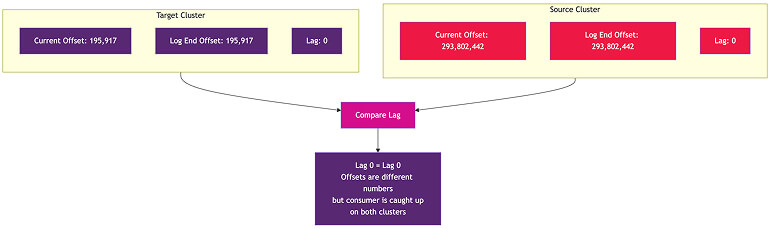
This is the final validation piece. MM2’s MirrorCheckpointConnector translates consumer group offsets from source to target — but does the translation actually produce the right result?
The approach: Compare lag, not offsets
You can’t compare raw offsets. The source might show current_offset = 293,802,442, while the target shows current_offset = 195,917. Comparing those numbers is meaningless.
What you can compare is lag. If the source shows a lag of zero — meaning the consumer is fully caught up — and the target also shows a lag of zero, then the offset translation is correct. The consumer will resume exactly where it should.
def validate_consumer_group(source_group_info, target_group_info, baseline):
    """
    Compare consumer group lag between source and target.

    source_group_info and target_group_info are dicts of:
    {(topic, partition): (current_offset, log_end_offset, lag)}
    """
    results = []

    for (topic, partition), source_info in source_group_info.items():
        target_info = target_group_info.get((topic, partition))

        source_lag = source_info.get('lag')

        if target_info is None:
            # No consumer entry on target; offset reset needed
            results.append({
                'topic': topic,
                'partition': partition,
                'lag_match': 'N/A',
                'note': 'target partition not synced',
                'needs_reset': True
            })
            continue

        if source_lag is None:
            # Consumer never committed on source
            results.append({
                'topic': topic,
                'partition': partition,
                'lag_match': 'N/A',
                'note': 'source no committed offset',
                'needs_reset': False
            })
            continue

        target_lag = target_info.get('lag')

        if source_lag == target_lag:
            results.append({
                'topic': topic,
                'partition': partition,
                'lag_match': 'YES',
                'note': 'lags equal',
                'needs_reset': False
            })
        else:
            results.append({
                'topic': topic,
                'partition': partition,
                'lag_match': 'NO',
                'note': f'source_lag={source_lag}, target_lag={target_lag}',
                'needs_reset': True
            })

    return results
Fetching consumer group data in bulk
Use kafka-consumer-groups.sh --describe --all-groups to get all consumer group details in a single call per cluster:
# Source cluster
kafka-consumer-groups.sh \
  --bootstrap-server <SOURCE_BOOTSTRAP> \
  --command-config consumer-ssl.properties \
  --describe --all-groups

# Target cluster
kafka-consumer-groups.sh \
  --bootstrap-server <TARGET_BOOTSTRAP> \
  --command-config consumer-ssl.properties \
  --describe --all-groups
The output includes the group name, topic, partition, current offset, log-end offset, lag, consumer ID, and host — everything you need for comparison.
Lag match results
Each partition gets one of these:
- YES —
lags_equal: Lags match. Ready for cutover. - NO —
gcp_consumer_aheadorgcp_consumer_behind: Lag mismatch. An offset reset is needed. - N/A —
source_no_committed_offset: The consumer never committed on the source. Theauto.offset.resetsetting will handle this. No action is needed. - N/A —
target_partition_not_synced: No consumer entry on the target. An offset reset is needed. - N/A —
consumer_before_baseline: The consumer is reading messages from before MM2 started. Those messages don’t exist on the target. A manual decision is required.
Resetting consumer offsets
For partitions that need a reset, the expected target offset can be calculated from the baseline:
def calculate_expected_target_offset(source_current_offset, baseline):
    """Translate a source consumer offset to the expected target offset."""
    return baseline['target'] + (source_current_offset - baseline['source'])
Then reset using the Kafka CLI:
kafka-consumer-groups.sh \
  --bootstrap-server <TARGET_BOOTSTRAP> \
  --command-config consumer-ssl.properties \
  --group <CONSUMER_GROUP> \
  --topic <TOPIC>:<PARTITION> \
  --reset-offsets \
  --to-offset <EXPECTED_TARGET_OFFSET> \
  --execute
Important safeguards before resetting:
- Verify all consumer groups are in an
Emptystate: Applications must be stopped. You can’t reset offsets while consumers are active. - Dry-run first: Generate the reset commands without executing, review them, and then execute.
- Test with one group first: Reset a single consumer group, re-run validation to confirm it worked, and then proceed with the rest.
# Check consumer group state before resetting
kafka-consumer-groups.sh \
  --bootstrap-server <TARGET_BOOTSTRAP> \
  --command-config consumer-ssl.properties \
  --describe --all-groups --state
If a group shows Stable with active members, stop the application first. If it shows Empty, it’s safe to reset.
Skipping irrelevant consumer groups
Not every consumer group needs validation. Maintain a skip list for:
- Applications that manage their own checkpoints: Some applications might manage their own checkpoints rather than using Kafka offsets.
- Groups consuming non-replicated topics: If the topic isn't being migrated, the consumer group doesn't matter.
- Dead or defunct groups: These groups no longer have active applications.
Part F: The cutover — Putting it all together
Everything above is preparation. Cutover day is when it all comes together in a specific sequence.
Pre-cutover (days before)
- Refresh metadata: Make sure your topic list — partition counts and compaction flags — and consumer group skip list are current.
- Verify baselines: All active partitions should have validated baselines, with no missing sync records.
- Confirm monitoring: The dashboard should show all partitions as healthy, with the gap near zero during active traffic.
- Dry-run validation: Run spot checks and consumer group validation on a few topics to catch any issues.
Cutover sequence
Step 1 — Sanity check: Capture consumer group offsets from both clusters. This is your "before" snapshot for comparison.
kafka-consumer-groups.sh \
  --bootstrap-server <TARGET_BOOTSTRAP> \
  --command-config consumer-ssl.properties \
  --describe --all-groups > consumer_groups_before_cutover.txt
Step 2 — Verify the replication gap is zero: Check the monitoring dashboard or run the monitor manually. Every partition should show a gap of zero. If producers are still running on the source, wait until they stop and MM2 catches up fully.
Step 3 — Run spot-check validation: Run this across all topics. This takes about two hours. Every partition should show PASS. Run it with nohup since it's long-running. For compacted topics, run the key-by-key comparison separately. Every key should show PASS.
Step 4 — Run consumer group validation: Check the lag_match column in the output. YES, and valid N/A entries are fine. Any NO entries need offset resets.
Step 5 — Pause and stop MM2: First, pause all three connectors via the REST API:
curl -X PUT http://localhost:8083/connectors/mm2-source-to-target/pause
curl -X PUT http://localhost:8083/connectors/mm2-checkpoint-connector/pause
curl -X PUT http://localhost:8083/connectors/mm2-heartbeat-connector/pause
Then stop the Kafka Connect worker process on each MM2 VM:
ps aux | grep "distributed"
sudo kill <pid>
Step 6 — Reset consumer offsets (if needed): For any partitions with lag mismatches, execute the reset commands. Re-run the consumer group validator to confirm everything now shows YES or valid N/A.
Step 7 — Stop the monitoring cron: The source cluster is about to go away, so the monitor will start erroring. Comment out the cron entry.
Step 8 — Shut down the source cluster: Run this on each source broker.
sudo systemctl stop kafka
sudo systemctl disable kafka
sudo shutdown -h now
Step 9 — Start applications on target: Applications switch their bootstrap.servers configuration to the target cluster. Consumers resume from the translated offsets, and producers start writing to the target.
Post-cutover verification
After applications start on the target:
Verify consumer groups are active: Groups should show a Stable state with active members:
kafka-consumer-groups.sh \
  --bootstrap-server <TARGET_BOOTSTRAP> \
  --command-config consumer-ssl.properties \
  --describe --all-groups --members
Check consumer lag: The lag should be zero or decreasing rapidly as consumers process any backlog:
kafka-consumer-groups.sh \
  --bootstrap-server <TARGET_BOOTSTRAP> \
  --command-config consumer-ssl.properties \
  --describe --all-groups
Capture a full status snapshot: Export all consumer group details to a CSV for the record. Compare it against the pre-cutover snapshot to confirm everything is accounted for.
Lessons learned
A few things to remember when performing this process:
- Start baseline capture early: Don't wait until cutover week. Some partitions are low-traffic and might take days to produce their first message — and first sync record. The earlier you start, the fewer last-minute gaps you must chase.
- Automate the iterative sync hunt: The "search for missing sync record → append to dump → re-run baseline with merge" loop works, but running it manually for dozens of partitions is tedious. Script the entire loop if you can.
- Test the full cutover sequence in a non-production environment first: We ran through the entire cutover in QA environments multiple times. It caught the base64 encoding problem, the
offset.lag.maxissue, and consumer groups that needed special handling — all before they could affect production. - Keep everything idempotent: Baselines use a merge strategy that preserves existing data. Consumer group validation generates reset commands without executing them. Spot checks can be re-run safely. This makes the whole process safe to iterate on, which you will do many times.
- Compacted topic validation takes time: Consuming all messages from both clusters for a compacted topic with millions of records is slow. Budget at least two hours for the full validation pass and run it in the background.
- The monitoring cron is your best friend: Having a minute-by-minute view of the replication gap for every partition gave us confidence throughout the migration process — not just at cutover, but during the weeks of preparation. When something went wrong — a connector restart, a network blip — we saw it immediately.
- Consumer group resets are the scariest part: Everything else is read-only validation. Resetting offsets actually changes the state on the target cluster. Always dry-run first, test with one group before doing all of them, and verify after.
Series recap
If you've made it through all three parts, you now have the complete picture:
- Part One — Kafka's architecture: We covered brokers, topics, partitions, offsets, replication,
KRaftcontrollers, consumer groups, and compacted topics — all explained through the lens of "here's why migration is hard." - Part Two — MirrorMaker 2: We explored how it works on top of Kafka Connect, the three connectors and their data flows, the properties file and connector JSON configurations, the deployment architecture, and the production traps that aren't in the documentation — properties vs. connector config,
ByteArrayConverter, andoffset.lag.max. - Part Three — Validation and cutover: We broke down the baseline approach for count validation, Datadog monitoring for continuous gap tracking, spot-check validation with hash comparison, compacted topic key-by-key validation, consumer group offset translation verification, and the step-by-step cutover procedure.
Every approach, every formula, and every code snippet came from the experience of a real production migration. I hope this series saves someone the weeks of trial and error it took me to figure it all out.
- Apache Kafka Consumer Group Management: How consumer groups, offsets, and lag work.
- kafka-consumer-groups.sh Documentation: The CLI tool for describing and resetting consumer group offsets.
- MM2 Offset Sync Internals (KIP-382): How MM2 maintains offset mappings between clusters.
- Log Compaction Documentation: How compacted topics work and why validation differs.
- Datadog StatsD Integration: Sending custom metrics from applications.
- kafka-console-consumer.sh Documentation: Consuming messages from specific offsets.
Partner with the Google Cloud experts at Insight to de-risk your migration, validate your architecture, and ensure a seamless cutover. Talk to a specialist today.
About the author:

Pinakin Parkhe
Staff Data Engineer, Insight
Pinakin is a data engineer at Insight specializing in the Google Cloud data stack, including Dataflow, Spanner, BigQuery, and Pub/Sub. He builds and tunes large-scale streaming and migration pipelines, gravitating toward the complex, under-documented problems that most engineers learn the hard way.
 Monthly perspectives from global tech leaders.