Blog Silent Overrides and Production Traps: Deploying Kafka MirrorMaker 2
By Pinakin Parkhe / 9 Jul 2026 / Topics: Cloud , Migration

Key takeaways
- MirrorMaker 2 builds on Kafka Connect: Understanding its foundational architecture — including the three distinct connectors and their specific data flows — is crucial for planning your deployment.
- Configuration requires precision: Successfully setting up the deployment architecture means carefully navigating the differences between the properties file and the connector JSON configurations.
- Real-world migrations reveal undocumented production traps: Be prepared for hidden challenges not found in the official documentation, such as issues with properties vs. connector config,
ByteArrayConverter, andoffset.lag.max.
In the second installment of our three-part series, we’ll walk through the operational execution of cross-cloud Apache Kafka migrations using MirrorMaker 2 (MM2), focusing on configuring real-time replication and validating a cluster state. Building on the architectural foundation established in Part One, this post provides the technical steps necessary to configure properties, deploy connectors, and prevent silent configuration failures during live synchronization.
When deploying MM2 for enterprise migrations, subtle configuration risks can jeopardize your target environment’s stability. For example, you might explicitly define replication.factor = 3 in your MM2 properties file. However, after restarting the connectors, your target topics may still be generated with a replication factor of two.
In this scenario, the configuration change is silently overridden. Kafka brokers often defer to destination cluster defaults rather than your migration tool’s localized parameters. This creates an unmapped vulnerability, leaving your target environment without the intended fault tolerance and high availability required for production workloads. To mitigate this risk, you must verify replication factors directly at the target cluster level during execution. This step ensures your architecture remains resilient before traffic cutover.
The problem
You have a production Kafka cluster that needs to move to a different cloud with zero message loss. Consumer groups must resume at the exact right position, and compacted topics must arrive intact. In Part One, we covered what’s inside the cluster: brokers, partitions, offsets, replication, KRaft controllers, consumer groups, compacted topics, and why all of that makes migration genuinely hard.
Now we need the tool that actually does it. Disk files can’t be copied across clouds because the target cluster has different broker IDs, different partition assignments, and a different internal state. To meet this demand, we need a tool that replicates at the Kafka protocol level, maintains offset mappings between clusters, translates consumer group positions, and runs continuously until you’re ready to cut over.
That tool is MirrorMaker 2. This post covers how it works, how we configured it, and the operational lessons that aren’t in the documentation.
What is MirrorMaker 2?
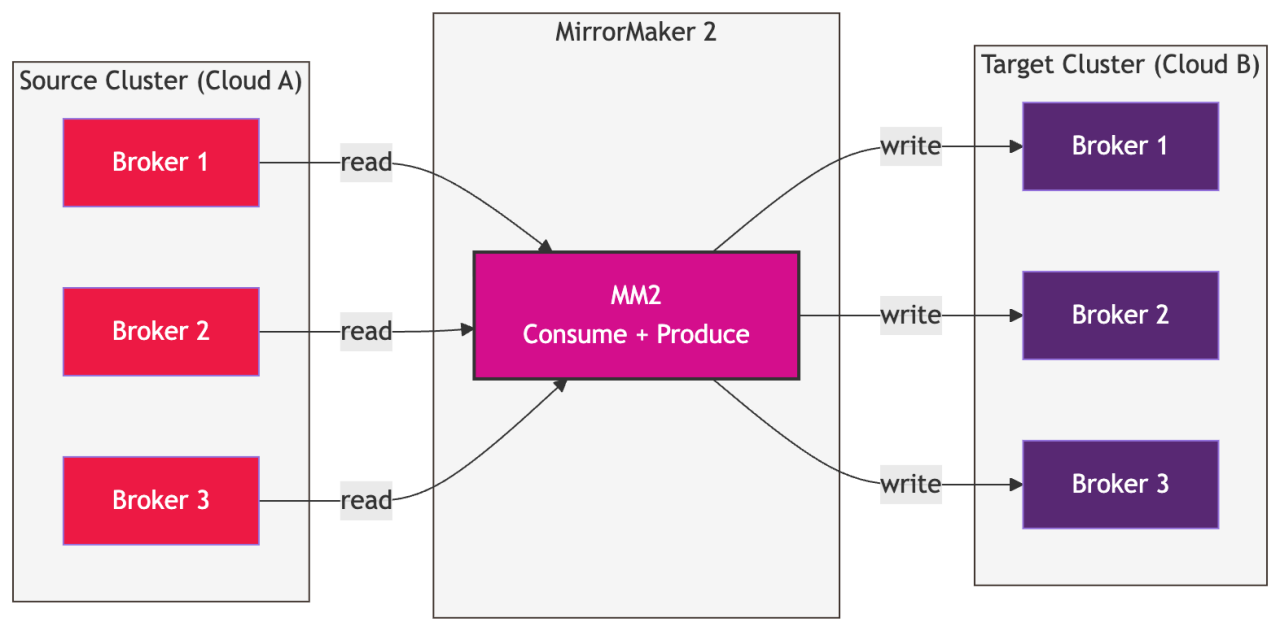
MirrorMaker 2 is Apache Kafka’s built-in tool for replicating data between Kafka clusters. It was introduced in KIP-382 as a complete rewrite of the original MirrorMaker, and it’s built on top of the Kafka Connect framework.
What does it actually do? At its core, MM2 consumes messages from a source cluster and produces them to a target cluster — but it does much more than simple consume-and-produce. It maintains offset mappings between clusters, syncs consumer group offsets, replicates topic configurations, and emits heartbeats for monitoring replication health.
In Part One, we discovered the migration problem, which included source offsets in the billions, targets starting from zero, and consumer groups needing to resume at the right position. MM2 is what solves all of that.
Why Kafka Connect?
MM2 doesn’t run as a standalone application. It runs as a set of connectors on top of the Kafka Connect framework. This architectural design determines how you deploy, configure, and operate MM2.
Kafka Connect is a framework for building and running connectors that move data into and out of Kafka. It handles the hard parts of distributed systems — such as task distribution, fault tolerance, offset management, and configuration — allowing connectors to focus on the actual data movement.
Kafka Connect can run in two modes:

- Standalone mode: A single process runs all connectors and tasks. It is simple to set up but offers no fault tolerance. If the process dies, replication stops.
- Distributed mode: Multiple connect worker processes form a cluster. Connectors and tasks are distributed across workers. If a worker dies, its tasks are automatically rebalanced to the surviving workers. This is what you want for production.
We ran Kafka Connect in distributed mode across three dedicated Virtual Machines (VMs), forming a connect cluster specifically for MM2. These VMs sit in the same network as the target Kafka cluster and have connectivity to both the source and target clusters.
The 3 connectors
MM2 isn’t a single connector. It’s actually three connectors working together, each with a distinct responsibility:
1. MirrorSourceConnector
This connector is the workhorse. It consumes messages from the source cluster and produces them to the target cluster. While it is a single connector instance, it fans out into multiple tasks (this example used six) that run in parallel, each handling a subset of partitions.
The MirrorSourceConnector also writes offset sync records to a special internal topic called mm2-offset-syncs.<target-alias>.internal on the source cluster. These records map source offsets to target offsets for each partition. This mapping is how MM2 knows that offset 1,936,789,047 on the source corresponds to offset 5,531,577 on the target.
2. MirrorCheckpointConnector
This connector handles consumer group offset translation. It reads the offset mappings written by the MirrorSourceConnector, fetches consumer group offsets from the source cluster, translates them using those mappings, and writes the translated offsets to _consumer_offsets on the target cluster.
It also writes to <source-alias>.checkpoints.internal on the target, a topic that stores checkpoint records for auditing and debugging.
This is what enables consumers to resume at the correct position on the target cluster after a cutover.
3. MirrorHeartbeatConnector
This is the simplest of the three. It periodically emits heartbeat records to a heartbeat topic on the target cluster. Each heartbeat contains a timestamp from the source cluster. By comparing this timestamp with when the heartbeat arrives on the target, you can measure replication latency.
Missing heartbeats mean replication has stalled. We configured heartbeats to emit every five seconds.
How the 3 connectors work together
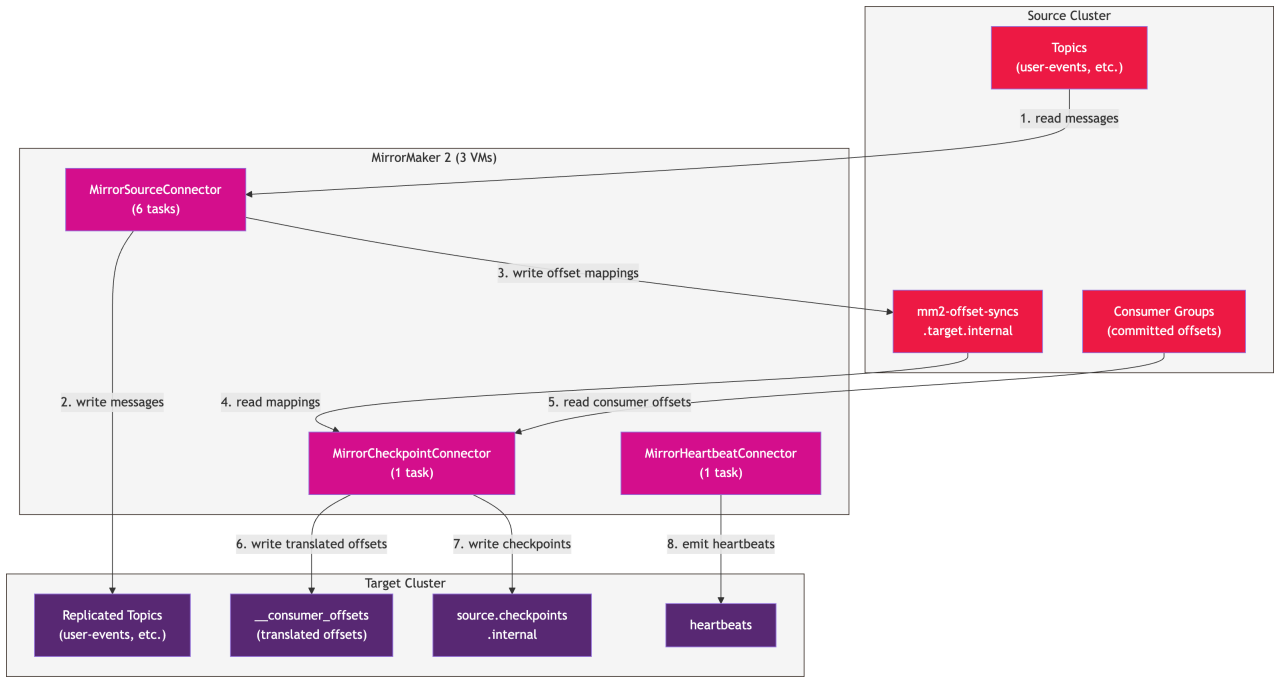
The architectural flow:
- The MirrorSourceConnector: This connector establishes the primary data bridge. It reads messages directly from the source cluster, writes them to the target cluster, and maintains track of the progress by writing offset mappings to the internal topic
mm2-offset-syncs.<target>.internalon the source cluster. - The MirrorCheckpointConnector: This component manages consumer group states. It reads both the offset mappings and the active consumer group offsets from the source cluster, translates them to match the target cluster’s log segments, and writes the translated offsets directly to the
_consumer_offsetstopic on the target. Additionally, it writes audit records to the<source>.checkpoints.internaltopic on the target cluster for tracking. - The MirrorHeartbeatConnector: Dedicated to health and performance verification, this connector actively emits heartbeats to the heartbeats topic on the target cluster, enabling real-time latency monitoring across environments.
Key internal topics:
| Topic | Lives On | Purpose |
mm2-offset-syncs.<target>.internal |
Source | Maps source offset to target offset per partition |
<source>.checkpoints.internal |
Target | Consumer group checkpoint records for auditing |
__consumer_offsets |
Target | Where translated consumer offsets are written for failover |
heartbeat |
Target | Replication health monitoring |
Deployment architecture
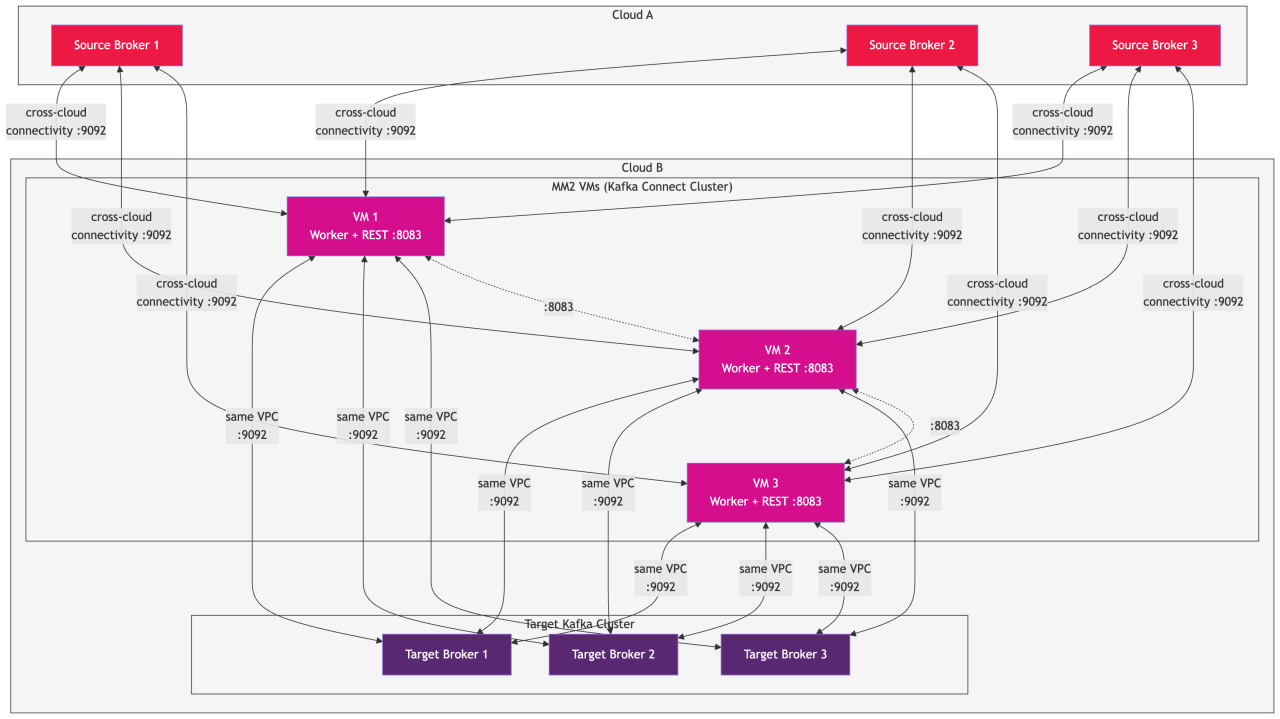
Our MM2 deployment consists of:
- Three dedicated VMs: These run Kafka Connect in distributed mode.
- Colocated infrastructure: All three VMs reside in the same Virtual Private Cloud (VPC) as the target Kafka cluster for low-latency writes to the target.
- Cross-cloud connectivity: This is established between the source and target (the VMs can reach the source cluster’s brokers over the network).
- Consistent versions: Kafka 3.6.0 is installed on all MM2 VMs, matching the broker version.
Each VM runs the same Kafka Connect distributed worker process. The workers form a cluster using a shared group.id and coordinate through three internal topics on the target cluster:
| Internal Topic | Partitions | Purpose |
mirrormaker2-cluster-configs |
1 | Stores connector configurations |
mirrormaker2-cluster-offsets |
25 | Tracks connector offsets (where each task left off) |
mirrormaker2-cluster-status |
5 | Connector and task status |
All three are compacted topics, which we created manually on the target cluster before starting Kafka Connect. The partition counts matter — connect-offsets needs enough partitions to handle the parallelism (25 is a reasonable default).
The properties file: Configuring the connect workers
Each VM has a properties file (mm2-distributed.properties) that configures the Kafka Connect distributed worker. This file contains several sections, and understanding each one is important because some settings behave in ways you might not expect.
Cluster definition
clusters = source, target
This declares the two clusters MM2 recognizes. We use source and target aliases, which appear throughout the rest of the configuration. You can name these anything (e.g., aws and gcp, or primary and secondary).
Source and target connection
# Source Cluster
source.bootstrap.servers = source-kafka.example.com:9092
source.security.protocol = SASL_SSL
source.sasl.mechanism = PLAIN
source.sasl.jaas.config = org.apache.kafka.common.security.plain.PlainLoginModule required username="<USERNAME>" password="<PASSWORD>";
source.ssl.truststore.location = /path/to/source-truststore.jks
source.ssl.truststore.password = <TRUSTSTORE_PASSWORD>
source.ssl.endpoint.identification.algorithm =

# Target Cluster
target.bootstrap.servers = 10.0.0.1:9092,10.0.0.2:9092,10.0.0.3:9092
target.security.protocol = SASL_SSL
target.sasl.mechanism = PLAIN
target.sasl.jaas.config = org.apache.kafka.common.security.plain.PlainLoginModule required username="<USERNAME>" password="<PASSWORD>";
target.ssl.truststore.location = /path/to/target-truststore.jks
target.ssl.truststore.password = <TRUSTSTORE_PASSWORD>
target.ssl.endpoint.identification.algorithm =
Note that ssl.endpoint.identification.algorithm is set to empty. This disables hostname verification in the SSL handshake, which is often necessary when using internal IPs for the target cluster.
Consumer configuration (source → target)
source->target.consumer.group.id = mm2-source-to-target
source->target.consumer.auto.offset.reset = latest
source->target.consumer.enable.auto.commit = false
source->target.consumer.max.poll.records = 1000
source->target.consumer.fetch.min.bytes = 1048576
source->target.consumer.fetch.max.wait.ms = 500
source->target.consumer.max.partition.fetch.bytes = 10485760
The source->target prefix means these settings apply to the consumer that reads from the source cluster for replication to the target.
auto.offset.reset = latest is critical. It means when MM2 starts replicating a topic for the first time, it starts from the latest message, not from the beginning. We explicitly chose this because we didn’t need historical data on the target. The applications had already consumed those messages on the source, and the migration was weeks away. Replicating from earliest for a high-volume topic could overwhelm the target cluster.
However, for compacted topics, we used earliest. Compacted topics represent state (such as mappings or configuration), and you need the full snapshot on the target. More on this when we discuss the connector JSON.
Producer configuration (source → target)
source->target.producer.acks = all
source->target.producer.retries = 3
source->target.producer.batch.size = 65536
source->target.producer.linger.ms = 10
source->target.producer.max.in.flight.requests.per.connection = 5
source->target.producer.buffer.memory = 67108864
source->target.producer.compression.type = lz4
The producer writes to the target cluster. acks=all ensures every replicated message is acknowledged by all in-sync replicas on the target before MM2 considers it delivered. compression.type = lz4 reduces network bandwidth for cross-cloud replication.
Replication factors
replication.factor = 3
checkpoints.topic.replication.factor = 3
heartbeats.topic.replication.factor = 3
offset-syncs.topic.replication.factor = 3
Since our target cluster has three brokers, we set the replication factor to three across the board. This includes the internal MM2 topics and any topics MM2 auto-creates on the target.
Kafka Connect distributed mode settings
group.id = mm2-connect-cluster

config.storage.topic = mirrormaker2-cluster-configs
offset.storage.topic = mirrormaker2-cluster-offsets
status.storage.topic = mirrormaker2-cluster-status

config.storage.replication.factor = 3
offset.storage.replication.factor = 3
status.storage.replication.factor = 3
The group.id is what makes the three VMs form a single connect cluster. All three must use the same group.id. The storage topics are the internal topics we created earlier.
Distributed worker configuration
rest.advertised.host.name = <THIS_VM_IP>
rest.advertised.port = 8083
rest.port = 8083

bootstrap.servers = 10.0.0.1:9092,10.0.0.2:9092,10.0.0.3:9092

key.converter = org.apache.kafka.connect.json.JsonConverter
value.converter = org.apache.kafka.connect.json.JsonConverter
key.converter.schemas.enable = false
value.converter.schemas.enable = false

plugin.path = /usr/share/java
rest.advertised.host.name is the only setting that differs between the three VMs. Each VM advertises its own IP so the connect cluster members can find each other over the REST API. Everything else is identical.
The bootstrap.servers here points to the target cluster. This is where Kafka Connect stores its internal state (e.g., configs, offsets, and status).
Replication policy
replication.policy.class = org.apache.kafka.connect.mirror.IdentityReplicationPolicy
By default, MM2 renames replicated topics by adding the source cluster alias as a prefix. A topic called user-events on the source would become source.user-events on the target. The IdentityReplicationPolicy disables this renaming, keeping the original topic names. This is essential for transparent failover. Applications don’t need to change their topic names when switching clusters.
Task configuration
tasks.max = 6
source->target.source.tasks.max = 6
source->target.checkpoint.tasks.max = 3
source->target.heartbeat.tasks.max = 3
Six source tasks mean six parallel threads consuming from the source and producing to the target. The checkpoint and heartbeat connectors need fewer tasks because they have lower throughput.
Performance tuning
max.poll.interval.ms = 300000
session.timeout.ms = 30000
heartbeat.interval.ms = 3000
producer.max.request.size = 1048576
consumer.max.poll.interval.ms = 300000
These control the connect worker’s session management and polling behavior. The five-minute max.poll.interval.ms gives tasks enough time to process large batches without being considered dead.
Starting the connect cluster
Each VM starts the Connect worker with:
sudo KAFKA_HEAP_OPTS="-Xmx6g -Xms6g" JMX_PORT=9999 nohup \
  /path/to/kafka/bin/connect-distributed.sh \
  /path/to/config/mm2-distributed.properties \
  >> /var/log/kafka/connect-distributed.log 2>&1 &
A 6GB heap is allocated per VM. JMX is enabled for monitoring. The nohup command keeps it running after you disconnect, and log rotation is configured to keep seven days of logs.
Once all three workers are up, verify the cluster:
curl http://localhost:8083/
This returns the connect cluster version information if everything is healthy.
The connector JSONs: Deploying connectors via REST API
The properties file configures the connect workers. The actual connectors are deployed separately via the Kafka Connect REST API using JSON configurations. This separation is important — and it’s also the source of one of the biggest production traps we encountered.
Deploying the MirrorSourceConnector
curl -X POST -H "Content-Type: application/json" \
  --data-binary @mm2-source-connector.json \
  http://localhost:8083/connectors
The connector JSON appears as follows:
{
  "name": "mm2-source-to-target",
  "config": {
    "connector.class": "org.apache.kafka.connect.mirror.MirrorSourceConnector",
    "tasks.max": "6",
    "clusters": "source,target",
    "source.cluster.alias": "source",
    "target.cluster.alias": "target",

    "topics": "user-events,order-updates",

    "source.cluster.bootstrap.servers": "source-kafka.example.com:9092",
    "source.cluster.security.protocol": "SASL_SSL",
    "source.cluster.sasl.mechanism": "PLAIN",
    "source.cluster.sasl.jaas.config": "...PlainLoginModule required username="<USERNAME>" password="<PASSWORD>";",
    "source.cluster.ssl.truststore.location": "/path/to/source-truststore.jks",
    "source.cluster.ssl.truststore.password": "<PASSWORD>",

    "target.cluster.bootstrap.servers": "10.0.0.1:9092,10.0.0.2:9092,10.0.0.3:9092",
    "target.cluster.security.protocol": "SASL_SSL",
    "target.cluster.sasl.mechanism": "PLAIN",
    "target.cluster.sasl.jaas.config": "...PlainLoginModule required username="<USERNAME>" password="<PASSWORD>";",
    "target.cluster.ssl.truststore.location": "/path/to/target-truststore.jks",
    "target.cluster.ssl.truststore.password": "<PASSWORD>",

    "replication.policy.class": "org.apache.kafka.connect.mirror.IdentityReplicationPolicy",
    "replication.factor": "3",
    "consumer.auto.offset.reset": "latest",

    "offset.lag.max": "0",
    "emit.heartbeats.interval.seconds": "5",
    "emit.checkpoints.interval.seconds": "5",
    "sync.group.offsets.interval.seconds": "5",

    "key.converter": "org.apache.kafka.connect.converters.ByteArrayConverter",
    "value.converter": "org.apache.kafka.connect.converters.ByteArrayConverter"
  }
}
Let’s break down the important parts:
- topics: An explicit list of topics to replicate. We didn’t use regex patterns — we listed topics explicitly and added new ones incrementally.
- replication.factor: Set to three in the connector JSON. This is critical — more on this in the production traps section.
- consumer.auto.offset.reset: Set to latest in the connector JSON.
- offset.lag.max: Set to zero. This one deserves its own explanation.
Understanding offset.lag.max
The offset.lag.max parameter controls how frequently the MirrorSourceConnector writes offset mapping records to the mm2-offset-syncs topic. With the default value of 100, the connector only writes an offset mapping after every 100 messages replicated per partition. For high-throughput topics, this is fine — you’ll get frequent mappings regardless. But for low-throughput topics, or during a cutover when traffic stops, the final offsets might never get synced.
Setting offset.lag.max=0 means every single message’s offset mapping is captured. This is more write-heavy on the sync topic, but it guarantees you always have the latest mapping available for offset translation. For a migration where accuracy matters more than throughput, this is the right tradeoff.
key.converterandvalue.converter: Set toByteArrayConverter. This is the fix for a nasty data encoding issue.
Deploying the checkpoint and heartbeat connectors
After the source connector is running, deploy the other two:
# Checkpoint connector
curl -X POST -H "Content-Type: application/json" \
  --data-binary @mm2-checkpoint-connector.json \
  http://localhost:8083/connectors

# Heartbeat connector
curl -X POST -H "Content-Type: application/json" \
  --data-binary @mm2-heartbeat-connector.json \
  http://localhost:8083/connectors
The checkpoint connector has its own cluster connection details and settings for offset sync frequency. The heartbeat connector is minimal — just cluster connections and a five-second heartbeat interval.
Verify all three are running:
curl -s http://localhost:8083/connectors | jq .

# Expected: ["mm2-source-to-target", "mm2-checkpoint-connector", "mm2-heartbeat-connector"]
Adding topics incrementally
You don’t add all topics at once. We started with a low-volume topic to validate the setup, then added more topics in batches.
When adding topics to an already running connector, you use a PUT request — not POST. The PUT replaces the entire connector configuration, so the new JSON must include all previously replicated topics plus the new ones:
curl -X PUT -H "Content-Type: application/json" \
  --data-binary @mm2-source-connector-v1.json \
  http://localhost:8083/connectors/mm2-source-to-target/config
For example, v0 had "topics": "user-events" and v1 had "topics": "user-events, order-updates, notifications".
MM2 won’t re-replicate existing topics from scratch. It tracks offsets internally and continues from where it left off. Only the new topics start replicating from the configured auto.offset.reset position.
For a topic that needed replication from the beginning (for example, a compacted configuration topic with a 91-day retention that consumers needed historically), we deployed a separate, dedicated connector with "consumer.auto.offset.reset": "earliest", replicating only that topic. This kept it isolated from the latest behavior of the main connector.
The production traps: Lessons learned the hard way
This section is the real value of this post. These are things that aren’t obvious from the documentation and cost us real debugging time.
Production trap 1: Properties file settings don’t always apply to connectors
This was the most confusing issue we hit. We had replication.factor = 3 and auto.offset.reset = latest in the properties file. Both were being ignored by the connector.
The reason: Connector-level consumer and producer configs need to be specified in the connector JSON, not the properties file. The properties file configures the Kafka Connect worker itself. The connector JSON configures the connector’s own consumers and producers.
We discovered that topics created by MM2 on the target had a replication factor of two (Kafka’s default) instead of three. And new topics were being replicated from earliest instead of latest.
The fix: Add "replication.factor": "3" and "consumer.auto.offset.reset": "latest" directly in the connector JSON. Once we did this and restarted the connector, both settings took effect.
Production trap 2: Base64 encoding of messages
After starting replication, we noticed that messages on the target looked different from the source. They were Base64 encoded. The raw bytes from the source were being converted to base64 strings on the target.
The root cause: Kafka Connect’s default converters (JsonConverter) interpret message bytes as JSON and serialize them accordingly. For MM2 — which should be a byte-perfect replication tool — this is disastrous. Messages should be replicated as-is, byte for byte.
The fix: Use ByteArrayConverter for both key and value:
"key.converter": "org.apache.kafka.connect.converters.ByteArrayConverter",
"value.converter": "org.apache.kafka.connect.converters.ByteArrayConverter"
Production trap 3: The offset.lag.max default
As described earlier, the default offset.lag.max=100 means offset mappings are only written every 100 messages per partition. For low-throughput topics or during a cutover, this means the final offsets may never be synced to the mm2-offset-syncs topic.
We discovered this when consumer group offset translation wasn’t working for some partitions — the MirrorCheckpointConnector had no recent offset mapping to use for translation.
The fix: "offset.lag.max": "0" in the source connector JSON.
Note for Kafka 3.7+ users: Kafka 3.7.0 introduced offset.flush.interval.ms (via KAFKA-15906), which adds time-based offset sync flushing. This lets you keep offset.lag.max=100 — reducing per-message overhead on the sync topic — while still ensuring periodic flushes for low-throughput partitions. If you’re on 3.7+, this is the better option. MirrorMaker 3.7.0 is backward compatible with Kafka 3.6.0 brokers — only the MM2 component needs upgrading.
SSL setup: Connecting across clouds
MM2 needs to authenticate with both source and target clusters. In our setup, both clusters used SASL_SSL, which meant each MM2 VM needed truststores for both clusters.
The setup process:
- Extract the source cluster’s server certificate using
openssl s_clientagainst the source bootstrap server. - Import it into a truststore (JKS format) using
keytool. - Extract the target cluster’s server certificate the same way.
- Import it into a separate truststore — or the same one.
- Verify both truststores contain the expected certificates.
- Test connectivity using
openssl s_clientto both clusters from each MM2 VM.
Both truststores are referenced in the properties file and connector JSONs. The JAAS config for SASL authentication is specified inline in the properties.
Before any of this, we validated network connectivity from every MM2 VM to every broker on both clusters (port 9092) and between MM2 VMs themselves (port 8083 for the Connect REST API). All of this was done with simple telnet checks.
Operating MM2: Day-to-day commands
Once MM2 is running, you interact with it primarily through the Kafka Connect REST API.
Check connector status:
curl -s http://localhost:8083/connectors/mm2-source-to-target/status | jq .
Check which partitions are assigned to tasks:
curl -s http://localhost:8083/connectors/mm2-source-to-target/tasks | jq -r '.[].config["task.assigned.partitions"]'
Pause all connectors (useful before cutover):
curl -X PUT http://localhost:8083/connectors/mm2-source-to-target/pause
curl -X PUT http://localhost:8083/connectors/mm2-checkpoint-connector/pause
curl -X PUT http://localhost:8083/connectors/mm2-heartbeat-connector/pause
Resume all connectors:
curl -X PUT http://localhost:8083/connectors/mm2-source-to-target/resume
curl -X PUT http://localhost:8083/connectors/mm2-checkpoint-connector/resume
curl -X PUT http://localhost:8083/connectors/mm2-heartbeat-connector/resume
Delete connectors (full stop):
curl -X DELETE http://localhost:8083/connectors/mm2-source-to-target
curl -X DELETE http://localhost:8083/connectors/mm2-checkpoint-connector
curl -X DELETE http://localhost:8083/connectors/mm2-heartbeat-connector
Stop the connect workers (on each VM):
ps aux | grep "distributed"
sudo kill <pid>
What’s next
At this point, MM2 is running, topics are replicating, offset mappings are being captured, and consumer group offsets are being translated. But how do you know it’s working? How do you verify that every message made it across? How do you confirm consumer groups will resume at the right position?
In Part Three, we’ll cover the validation and monitoring framework: the baseline approach for tracking replication progress; spot-check validation using SHA-256 hashes; consumer group offset verification; Datadog integration for continuous monitoring; compacted topic validation; and the step-by-step cutover procedure that ensures zero message loss.
References
KIP-382: MirrorMaker 2.0: The proposal that redesigned MirrorMaker on top of Kafka Connect
Apache Kafka MirrorMaker Documentation: Official documentation for geo-replication with MM2
Kafka Connect Documentation: How Kafka Connect distributed mode works
offset.lag.max Configuration: Official documentation for the offset lag parameter
KAFKA-15906: Time-based offset sync flushing: The Kafka 3.7.0 improvement that introduced offset.flush.interval.ms
IdentityReplicationPolicy: Javadoc for the replication policy that preserves original topic names
Kafka Connect REST API: Reference for managing connectors via REST
ByteArrayConverter: The converter that ensures byte-perfect replication
Ready to side-step deployment traps and execute your cloud migration with confidence? As Google Cloud experts, Insight can help you bridge infrastructure gaps, optimize performance, and de-risk your transition with a comprehensive Google Cloud Infrastructure Assessment.
About the author:

Pinakin Parkhe
Staff Data Engineer, Insight
Pinakin is a data engineer at Insight specializing in the Google Cloud data stack, including Dataflow, Spanner, BigQuery, and Pub/Sub. He builds and tunes large-scale streaming and migration pipelines, gravitating toward the complex, under-documented problems that most engineers learn the hard way.
 Monthly perspectives from global tech leaders.