Blog Billions of Offsets, Zero Data Loss: The Core Architecture of Cross-Cloud Kafka Migrations
By Pinakin Parkhe / 25 Jun 2026 / Topics: Cloud , Migration

Key takeaways
- Foundational architecture introduces complexity: The design of Kafka’s brokers, topics, and partitions creates unique hurdles when planning a migration.
- Offsets and replication demand precision: Managing data replication and tracking offsets are difficult but critical tasks to ensure a smooth transition.
- Controllers and consumer groups require orchestration: Transitioning KRaft controllers and active consumer groups requires careful coordination to avoid disruption.
- Compacted topics add a unique layer of difficulty: The specialized nature of compacted topics introduces intricate challenges that perfectly illustrate why migration is hard.
Cross-cloud Apache Kafka migrations are a high-stakes enterprise challenge. Your source cluster may have offsets in the billions while your target begins at zero, yet your consumers expect a seamless handoff with zero data loss or duplication. Navigating this technical gap requires a rock-solid strategy.
In this post, we kick off a deep-dive three-part series on executing complex Kafka migrations using MirrorMaker 2 (MM2), focusing heavily on maintaining your data integrity and operational continuity. We’ll explore the structural nuances of Kafka’s internal architecture, giving you the essential technical context you need to understand why precise synchronization is critical before you move a single byte of data.
The problem
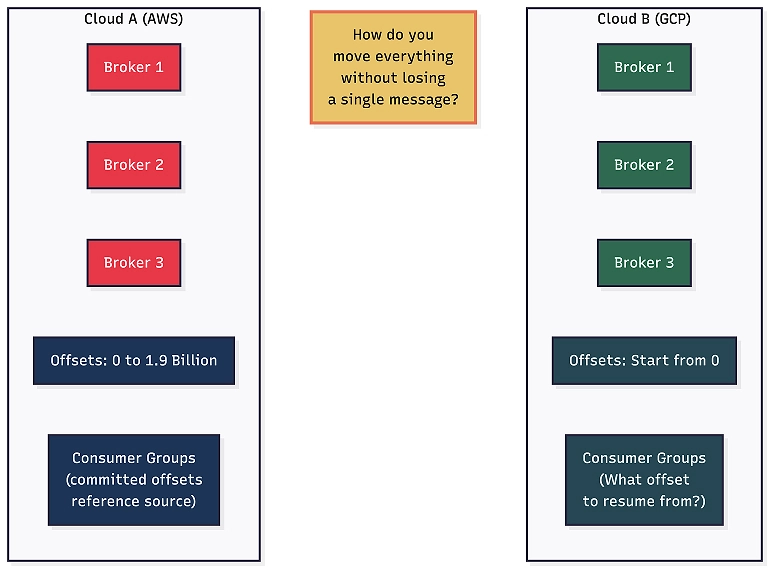
This cluster is running on Amazon Web Services (AWS) and needs to move to Google Cloud.
This isn’t a greenfield project or a fresh start: It is a live migration. The applications that produce to and consume from this cluster need to switch over to a new cluster on Google Cloud with:
- Zero message loss: Every message that was in flight during the migration must arrive at the target.
- Consumer continuity: Consumer groups must resume at the exact right position on the target cluster. Options like “start from the beginning” or “start from the latest” are off the table. We need exact offset translation, so no messages are reprocessed and none are skipped.
- Compacted topic integrity: For compacted topics, every key-value pair on the source must exist on the target with the same value.
- Minimal downtime: Ideally, the cutover is just a configuration change pointing applications to the new brokers.
Why traditional approaches fail
Faced with these constraints, standard infrastructure migration tactics fall short:
- You can’t just copy disk files: The new cluster has different broker IDs, different partition assignments, and an entirely different internal state.
- You can’t do a simple backup and restore: Because offset numbering on the new cluster starts from zero, all existing consumer group positions would be wrong.
You need a solution that replicates data at the Kafka protocol level, maintains an offset mapping between the source and target, translates consumer group positions, and runs continuously until you’re ready to cut over.
That solution is MirrorMaker 2.
The setup
For the purpose of this guide, we assume a standard architecture: a Kafka cluster consisting of three broker nodes and three controller nodes (whether running on AWS or Google Cloud). Kafka is installed, network connectivity between nodes is established, and your producers and consumers are functioning as expected.
To be clear, this series isn’t about how to install Kafka or configure cloud networking. That’s a prerequisite.
Instead, this series focuses on how to migrate an entire Kafka cluster from one cloud to another using MirrorMaker 2 — without losing a single message, breaking consumer state, or your applications noticing.
But before we configure MirrorMaker 2, we need to understand what’s actually running inside that cluster. We aren’t talking about generic textbook definitions here; we are looking at the exact operational mechanics that make a cross-cloud migration highly non-trivial.
Let’s build that understanding from the ground up.
What is Apache Kafka?
At its core, Kafka is a distributed event streaming platform. Think of it as a durable, high-throughput message bus. Producers write messages to Kafka, consumers read messages from Kafka, and Kafka stores those messages reliably across multiple servers.
What makes Kafka different from a traditional message queue is its retention model: Messages are not deleted after a consumer reads them. Instead, they persist based on a configurable retention policy, allowing any number of consumers to read the exact same data stream at their own pace.
While this design choice enables incredibly powerful event-driven architectures, it introduces a major operational dependency: Kafka has to track where each consumer is in the stream. This becomes a key challenge during migration.
Brokers: The workhorses
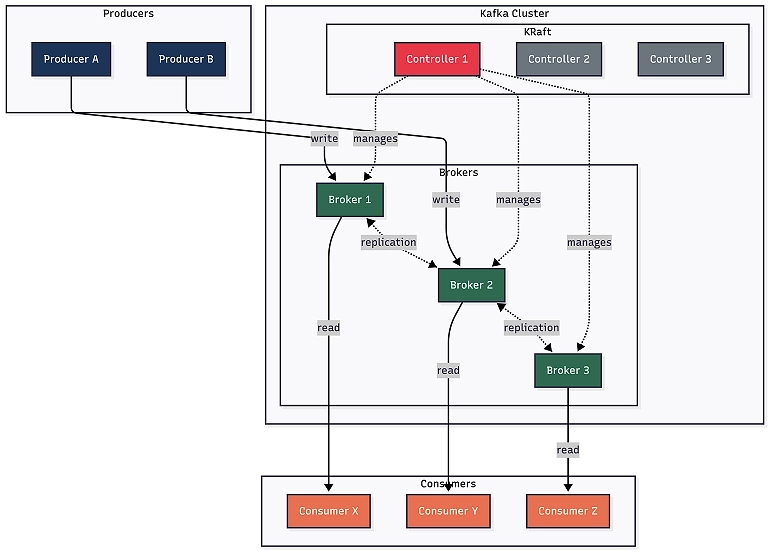
A Kafka broker is simply a server process running on a machine that stores messages and serves client requests. In our three-node cluster, we have three brokers, each identified by a unique integer ID (e.g., Broker 1, Broker 2, and Broker 3).
Every broker in the cluster can handle producer writes, consumer reads, and replication traffic simultaneously. There’s no single “master” that does all the work. When a producer sends a message, it goes directly to the specific broker that owns that piece of data. When a consumer reads, it goes directly to the relevant broker, too. This is how Kafka scales horizontally; more brokers mean more capacity.
Each broker also stores data on its local disk. Kafka messages aren’t kept in memory; they’re written to disk in an append-only fashion, which is how Kafka achieves both durability and surprisingly high throughput. The operating system’s page cache does the heavy lifting for reads.
Topics and partitions: How data is organized
Kafka organizes messages into topics. A topic is a logical channel, like a category or feed. You might have a topic called user-events, another called order-updates, and another called notifications. Producers write to a topic, and consumers read from a topic.
But here’s where it gets interesting. A topic isn’t stored as a single unit. It’s split into partitions, and this is where Kafka’s parallelism comes from.
Let’s say user-events have eight partitions (numbered zero through seven). Each partition is an ordered, immutable sequence of messages. When a producer sends a message, it goes to exactly one partition. Which partition? That depends on the message key:
- If the message has a key: Kafka hashes the key and uses that hash to determine the partition. The same key always goes to the same partition; this guarantees ordering for messages with the same key.
- If there’s no key: Kafka round-robins across partitions for even distribution.
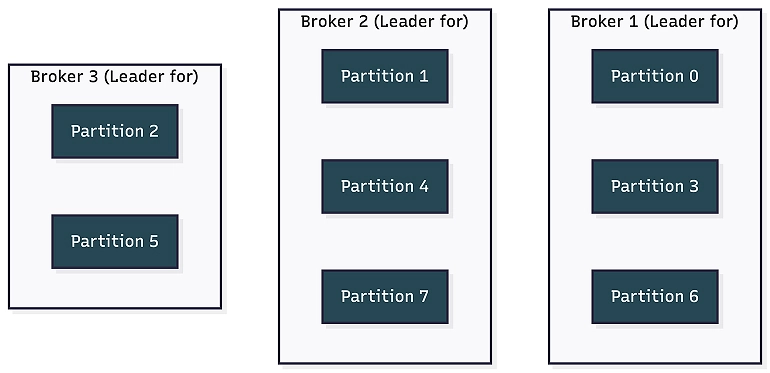
In our three-node cluster, these eight partitions are distributed across the available brokers. Broker 1 might host partitions zero, three, and six; Broker 2 gets partitions one, four, and seven; Broker 3 handles partitions two and five. This distribution is how Kafka spreads the load.
The role of partition leaders
To prevent data loss, each broker also holds “follower replicas” of the other brokers’ partitions (note that the diagram above illustrates leader assignments only).
Each partition has one leader broker that handles all reads and writes for that partition. If Broker 1 is the leader for partition zero, all producer writes to partition zero go to Broker 1, and all consumer reads from partition zero come from Broker 1. The other brokers maintain copies, but the leader is the single point of truth for that partition.
Offsets: Kafka’s addressing system

Every message within a partition gets a unique, sequential number called an offset. The first message ever written to a partition gets offset zero, the next gets one, then two, and so on. Offsets never go backwards and never reset (even if earlier messages get deleted by retention). For instance, if the earliest surviving message in a partition has offset 50,000 and the newest is offset 200,000, then the next message will be offset 200,001.
This is crucial to understand. Offsets are the mechanism by which Kafka tracks position. A consumer doesn’t say “give me the next message.” Instead, it says “give me the message at offset 150,001 in partition three of topic user-events.”
Two important offset concepts:
- Earliest offset: The offset of the oldest message still physically available in the partition. Anything before this number has been permanently deleted by log retention.
- Latest offset: The offset that will be assigned to the next message written to the log (essentially one position past the last existing message).
The difference between the latest and earliest offsets shows how many messages are currently stored. However, the earliest doesn’t start at zero unless it’s a brand-new partition. Once retention kicks in and deletes old segments, the earliest moves forward.
Replication: Surviving failures
Kafka doesn’t store each partition on just one broker, as that would be a single point of failure. Instead, each partition is replicated across multiple brokers.
The number of copies is controlled by the replication factor. With a replication factor of three (which is used in this example), every partition exists on three different brokers. In a three-broker cluster, that means every partition exists on every broker, with each broker having a copy.
But not all copies are equal. One copy is the leader, which handles all reads and writes. The other copies are followers (also called replicas). Followers continuously pull new data from the leader to stay in sync.
The set of replicas that are caught up with the leader is called the In-Sync Replicas (ISR). If a follower falls behind (maybe it’s slow or temporarily unavailable), it’s removed from the ISR. When the follower catches up, it rejoins.
Here’s what a healthy topic description looks like in a three-broker cluster:
Topic: user-events
Partition: 0
Leader: 1
Replicas: 1, 2, 3
ISR: 1, 2, 3
Topic: user-events
Partition: 1
Leader: 2
Replicas: 2, 3, 1
ISR: 1, 2, 3
Topic: user-events
Partition: 2
Leader: 3
Replicas: 3, 1, 2
ISR: 1, 2, 3
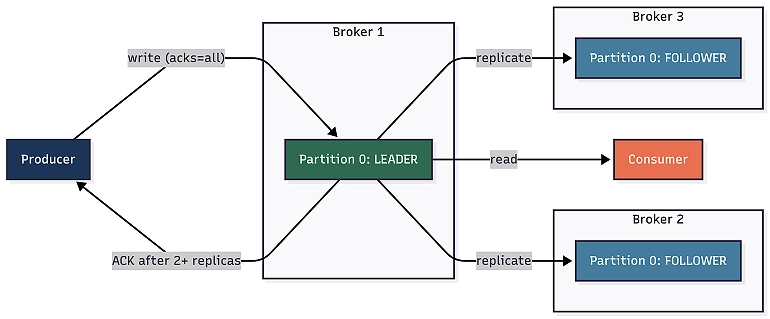
Notice how leaders are spread across all three brokers (1, 2, 3), which is Kafka balancing the load. And the ISR list matches the replicas list, which means all copies are fully caught up.
There’s also a configuration called min.insync.replicas (usually set to two). This means a write is only acknowledged to the producer if at least two replicas (including the leader) have received it. Combined with the producer setting acks=all, this guarantees that no acknowledged message can be lost, even if a broker goes down.
If a leader broker fails, Kafka promotes one of the in-sync followers to become the new leader. Producers and consumers are redirected automatically. To your applications, this failover is entirely transparent, resulting in nothing more than a brief network hiccup while the leadership transition finalizes.
The controller: Kafka’s brain
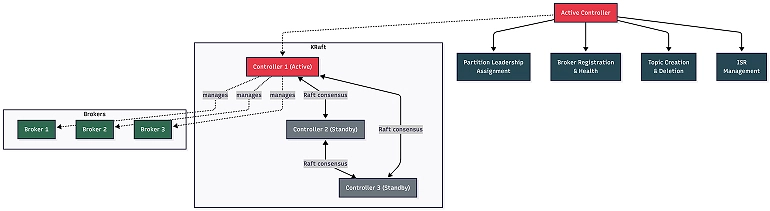
In every Kafka cluster, there’s a controller, which is the component responsible for the following administrative operations that keep the cluster running:
- Partition leadership assignment: When a broker goes down, the controller decides which follower gets promoted to leader for each affected partition.
- Broker registration: The controller tracks which brokers are alive and part of the cluster.
- Topic management: When you create or delete a topic, the controller handles the partition assignment.
- ISR management: The controller monitors which replicas are in sync and updates the ISR lists.
Only one controller is active at any time. But how that controller is chosen has undergone a fundamental shift in Kafka’s architecture.
From ZooKeeper to Kraft
Historically, Kafka relied on Apache ZooKeeper, a separate distributed coordination service, to manage controller election, broker registration, and cluster metadata. ZooKeeper worked, but it meant running and maintaining an entirely separate distributed system alongside Kafka. It added operational complexity, introduced its own failure modes, and became a bottleneck for large clusters.
Kafka Raft (KRaft) mode was introduced as a built-in consensus protocol that eliminates the ZooKeeper dependency entirely. In KRaft mode, Kafka manages its own metadata using the Raft consensus algorithm. In modern Kafka deployments, ZooKeeper is deprecated, and KRaft is the production standard for running Kafka clusters.
How KRaft works
In KRaft mode, the controller role is handled by dedicated controller nodes that are separate from the broker nodes. These controllers form a quorum, which is a group that uses the Raft protocol to elect a leader among themselves and maintain a replicated metadata log.
In our setup, we have:
- Three controller nodes: These form the controller quorum. One is the active controller, and the other two are standbys. If the active controller goes down, one of the standbys takes over automatically through a Raft election.
- Three broker nodes: These handle all the data operations (producer writes, consumer reads, and replication). Brokers register with the controller quorum and receive instructions about partition assignments, leadership changes, and topic configurations.
This separation is important. Controllers don’t store any topic data; they only manage metadata. Brokers don’t make cluster-level decisions; they just follow the controller’s instructions. Each layer has a clear responsibility.
The Raft consensus protocol ensures that all three controllers agree on the cluster state. The active controller writes to a special internal topic called __cluster_metadata (also called the metadata log), and the standby controllers replicate this log. If the active controller fails, one of the standbys already has the full metadata and can take over instantly — no ZooKeeper, no external dependencies.
Why this matters for migration
The controller quorum manages the entire cluster state, including which topics exist, how partitions are assigned, and which brokers are active. You can’t just copy this state between clouds. The target cluster has its own controller quorum, broker IDs, and __cluster_metadata log. Migration must happen at the data level, not the infrastructure level.
Consumer groups: Coordinated reading
A single consumer can successfully read from a topic. But in production, you almost always have multiple instances of an application, and you want them to share the work. This is where consumer groups come in.
A consumer group is a set of consumers that cooperate to consume a topic. Kafka ensures that each partition is assigned to exactly one consumer within the group. If the topic user-events has eight partitions and your consumer group has four consumers, each consumer gets two partitions. If you scale up to eight consumers, each gets exactly one partition. If you have more consumers than partitions, the extras sit idle.
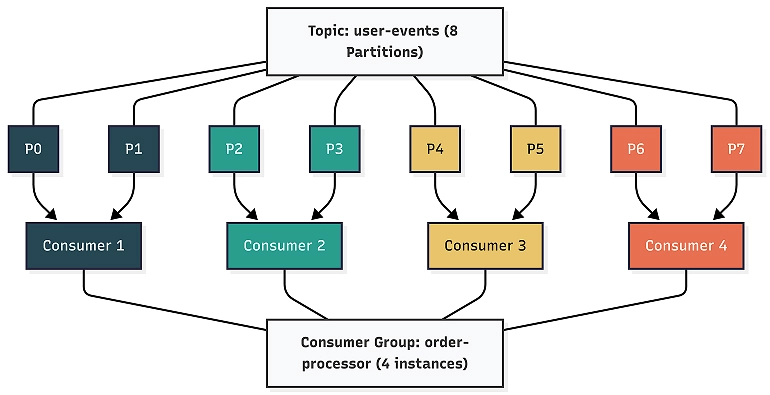
This is Kafka’s way of providing both parallel processing and ordering guarantees. Within a partition, messages are always processed in order (because offsets are sequential). Across partitions, processing happens in parallel.
When a consumer reads a message and processes it, it commits the offset, telling Kafka, “I’m done with everything up to this point.” Kafka stores these committed offsets in a special internal topic called __consumer_offsets. The next time that consumer (or a replacement in the same group) picks up that partition, it resumes from the committed offset.
The difference between the latest offset in a partition and the committed offset for a consumer group is called consumer lag. Zero lag means the consumer is fully caught up. Positive lag means there are unprocessed messages.
Now, think about migration. Every consumer group has committed offsets on the source cluster, referencing source offsets. On the target cluster, the offsets are completely different. Because the target cluster started fresh, offset zero on the target might correspond to an offset like 1,936,789,047 on the source. Getting consumers to resume at the right position on the target is one of the hardest parts of the migration.
Compacted topics: The exception to every rule
Most Kafka topics use delete retention; messages older than the retention period (for example, seven days) are eventually deleted. Simple enough.
But some topics use a different cleanup policy called compaction. These are compacted topics, and they behave fundamentally differently.
In a compacted topic, Kafka treats each message key as a unique entity. Instead of deleting messages based on age, Kafka keeps only the latest message for each key. Older messages with the same key are garbage-collected over time.
A compacted topic is like a database table. If you write key=user-1, value={name: “Pinakin”}, and then later write key=user-1, value={name: “Pinakin Parkhe”}, the compaction process eventually removes the first message. The topic acts as a changelog — a snapshot of the latest state for every key.
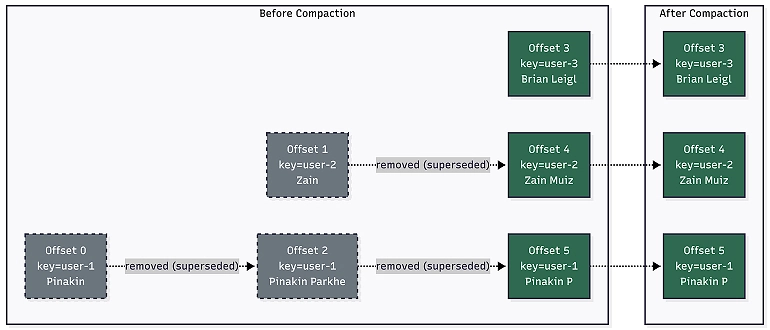
Real-world examples of compacted topics include configuration stores, tenant mappings, session state, and user profile caches.
What makes compacted topics tricky for migration
- You can’t validate them the same way as regular topics.
- With a regular topic, you can compare message counts: source has 50,000 messages, target has 50,000 messages, counts match, and you’re good. With a compacted topic, the source and target will almost certainly have different counts.
- This occurs because compaction runs independently on each cluster at different times, removing different old values. The source might have 800,000 messages while the target has 750,000, and that’s perfectly fine because both have the same latest value for every key.
- Validating compacted topics requires a key-by-key comparison.
- You must consume all messages from both the source and target, build a map of key-value pairs for each, and compare them. Any key present on the source should have the same value on the target.
- Warning: Some keys might have been compacted away on one side but not the other; that’s expected as long as the values that do exist match.
- Offsets are meaningless for count comparison.
- In a compacted topic, subtracting the earliest offset from the latest offset doesn’t tell you the actual number of live messages. There could be thousands of “tombstoned” (deleted) or compacted-away messages within that range.
We’ll cover our compacted topic validation approach in detail in part three of this blog series. For now, remember that compacted topics are different from regular topics, and any migration strategy that processes them like regular topics will produce misleading results.
Putting it all together: Our cluster
Let’s picture the full system. Our Kafka cluster has:
- Three broker nodes: Each stores data and serves reads and writes.
- Three controller nodes: These form a KRaft quorum, managing partition assignments, leadership, and cluster metadata. One is active, and two are on standby.
- Multiple topics: Some have delete retention, and some are compacted, with each split into partitions.
- Partitions replicated three ways: Every partition has a leader and two followers, spread across all brokers.
- Consumer groups: These are applications reading from topics, with committed offsets tracking their position.
- Offsets: This is the sequential numbering system that tracks every message’s position within a partition and every consumer’s progress.
Every single one of these things has accumulated state over time. Offsets on the source cluster might be in the billions. Consumer groups have committed positions that reference those offsets. Compacted topics have built up a key-value state through millions of updates.
What’s next
In part two, we’ll dive into MirrorMaker 2: how it works under the hood, how it runs as a Kafka Connect cluster in distributed mode, the configuration that drives it, and the hard-won operational lessons from running it in production.
These lessons include resolving issues around replication factors, managing offset reset behavior, and how ByteArrayConverter prevented silent data corruption.
In part three, we’ll cover validation and monitoring: how we built a baseline-driven approach for tracking replication progress, spot-checked message integrity using SHA-256 hashes, validated consumer group offset translation, integrated everything with Datadog, and executed a zero-message-loss cutover.
Ready to move beyond the pitfalls and build a cloud strategy with confidence? Insight can help you identify gaps, control costs, and drive innovation with a comprehensive Google Cloud Infrastructure Assessment.
About the Authors:

Pinakin Parkhe
Staff Data Engineer, Insight
Pinakin is a data engineer at Insight specializing in the Google Cloud data stack, including Dataflow, Spanner, BigQuery, and Pub/Sub. He builds and tunes large-scale streaming and migration pipelines, gravitating toward the complex, under-documented problems that most engineers learn the hard way.
 Monthly perspectives from global tech leaders.