Knowledge base How to Access and Use the Software Spend Analysis Tool
By Insight Editor / 3 Jul 2021
The myInsight Software Spend Analysis tool gives comprehensive license cost visibility to support your organization’s software strategy planning and management. Analyzing your past, present and future software spend is simple with reports that drill down by manufacturer, product material description, shipping location and more.
To access the Software Spend Analysis tool, log in to your myInsight account and navigate to the secondary menu on the left side. From there, select Reporting and then Software Spend Analysis.
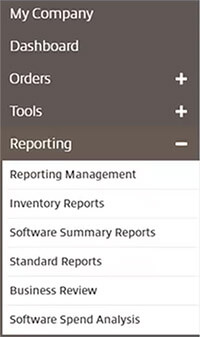
If you don’t have permission to access the Software Spend Analysis tool, you can reach out to your myInsight account administrator for permission. Administrators will work with their sales representative or the Insight e-commerce team to gain access.
Using Software Spend Analysis
The reporting tool includes four reporting categories — Past, Present, Future and Details — that allow you to analyze your organization’s software license costs.
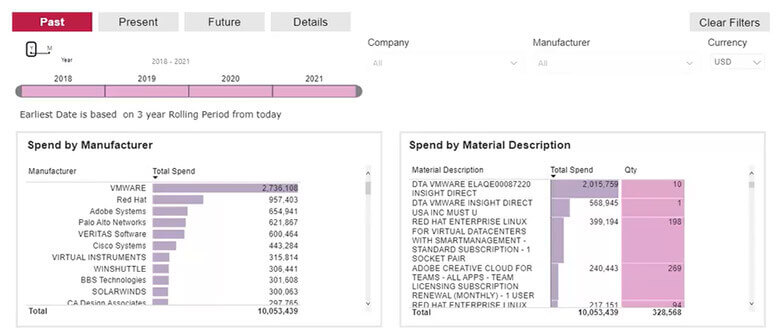
The categories can be filtered by Company, Manufacturer and Currency. Each category and filter can be accessed from the top of the Software Spend Analysis tool.
Here’s a breakdown of what you’ll find within each category:
- Past: Find up to three years of rolling data, broken down by account, manufacturer, material description, product and shipping location.
- Present: Discover year-over-year analysis of top-spending manufacturers, as well as month-over-month data.
- Future: Create software cost scenarios to aid in future planning by adjusting total spend by +/- percentages.
- Details: Access all order details for your software expenses.