How Windows 11 Pro Secures Your Modern Workforce
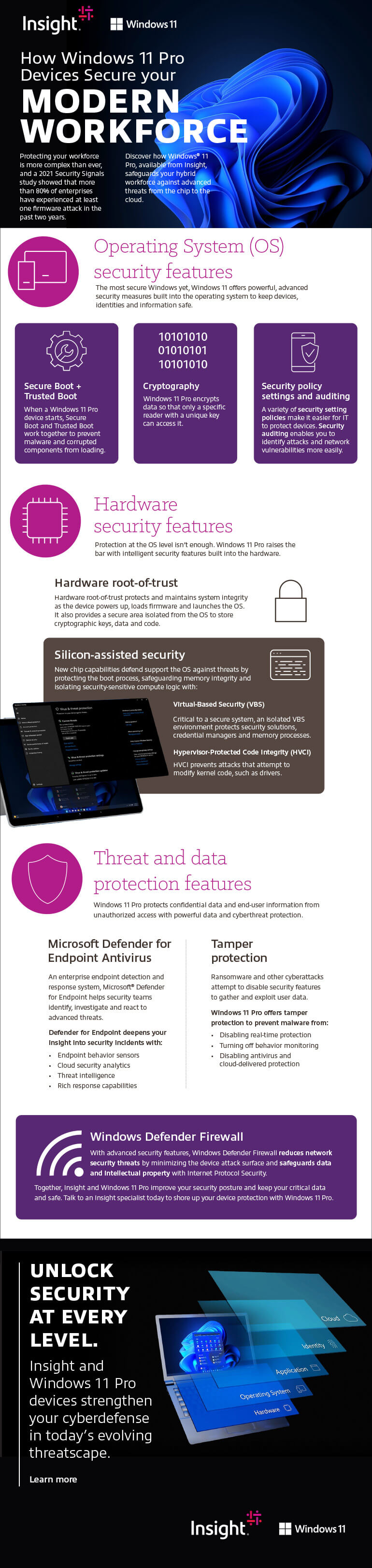
Protecting your workforce is more complex than ever, and a 2021 Security Signals study showed that more than 80% of enterprises have experienced at least one firmware attack in the past two years.
Discover how Windows® 11 Pro, available from Insight, safeguards your hybrid workforce against advanced threats from the chip to the cloud.
Operating System (OS) security features
The most secure Windows yet, Windows 11 offers powerful, advanced security measures built into the operating system to keep devices, identities and information safe.
Secure Boot + Trusted Boot
When a Windows 11 Pro device starts, Secure Boot and Trusted Boot work together to prevent malware and corrupted components from loading.
Cryptography
Windows 11 Pro encrypts data so that only a specific reader with a unique key can access it.
Security policy settings and auditing
A variety of security setting policies make it easier for IT to protect devices. Security auditing enables you to identify attacks and network vulnerabilities more easily.
Hardware security features
Protection at the OS level isn’t enough. Windows 11 Pro raises the bar with intelligent security features built into the hardware.
Hardware root-of-trust
Hardware root-of-trust protects and maintains system integrity as the device powers up, loads firmware and launches the OS. It also provides a secure area isolated from the OS to store cryptographic keys, data and code.
Silicon-assisted security
New chip capabilities defend support the OS against threats by protecting the boot process, safeguarding memory integrity and isolating security-sensitive compute logic with:
Virtual-Based Security (VBS)
Critical to a secure system, an isolated VBS environment protects security solutions, credential managers and memory processes.
Hypervisor-Protected Code Integrity (HVCI)
HVCI prevents attacks that attempt to modify kernel code, such as drivers.
Threat and data protection features
Windows 11 Pro protects confidential data and end-user information from unauthorized access with powerful data and cyberthreat protection.
Microsoft Defender for Endpoint
An enterprise endpoint detection and response system, Microsoft® Defender for Endpoint helps security teams identify, investigate and react to advanced threats. Defender for Endpoint deepens your insight into security incidents with:
- Endpoint behavior sensors
- Cloud security analytics
- Threat intelligence
- Rich response capabilities
Tamper protection
Ransomware and other cyberattacks attempt to disable security features to gather and exploit user data. Windows 11 Pro offers tamper protection to prevent malware from:
- Disabling real-time protection
- Turning off behavior monitoring
- Disabling antivirus and cloud-delivered protection
Windows Defender Firewall
With advanced security features, Windows Defender Firewall reduces network security threats by minimizing the device attack surface and safeguards data and intellectual property with Internet Protocol Security.
Together, Insight and Windows 11 Pro improve your security posture and keep your critical data and safe. Talk to an Insight specialist today to shore up your device protection with Windows 11 Pro.