4 Reasons to Make the Switch to ChromeOS With Insight
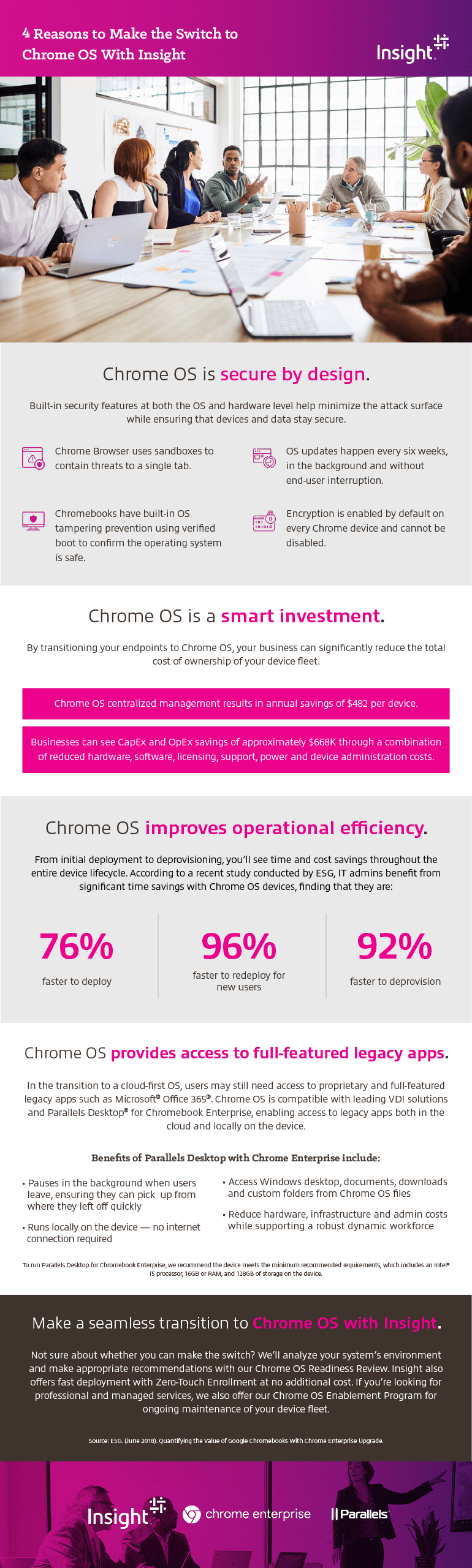
ChromeOS is secure by design.
Built-in security features at both the OS and hardware level help minimize the attack surface while ensuring that devices and data stay secure.
- Chrome Browser uses sandboxes to contain threats to a single tab.
- Chromebooks have built-in OS tampering prevention using verified boot to confirm the operating system is safe.
- OS updates happen every six weeks, in the background and without end-user interruption.
- Encryption is enabled by default on every Chrome device and cannot be disabled.
ChromeOS is a smart investment.
By transitioning your endpoints to ChromeOS, your business can significantly reduce the total cost of ownership of your device fleet.
- ChromeOS centralized management results in annual savings of $482 per device.
- Businesses can see CapEx and OpEx savings of approximately $668K through a combination of reduced hardware, software, licensing, support, power and device administration costs.
ChromeOS improves operational efficiency.
From initial deployment to deprovisioning, you’ll see time and cost savings throughout the entire device lifecycle. According to a recent study conducted by ESG, IT admins benefit from significant time savings with ChromeOS devices, finding that they are:
- 76% faster to deploy
- 96% faster to redeploy for new users
- 92% faster to deprovision
ChromeOS provides access to full-featured legacy apps.
transition to a cloud-first OS, users may still need access to proprietary and full-featured legacy apps such as Microsoft® Office 365®. ChromeOS is compatible with leading VDI solutions and Parallels Desktop for Chromebook Enterprise, enabling access to legacy apps both in the cloud and locally on the device.
Benefits of Parallels Desktop with Chrome Enterprise include:
- Pauses in the background when users leave, ensuring they can pick up from where they left off quickly
- Runs locally on the device — no internet connection required
- Designed for business users where IT administrators who can access devices enrolled with Chrome Enterprise Upgrade through the Google Admin Console
To run Parallels Desktop for Chromebook Enterprise, we recommend the device meets the minimum recommended requirements, which includes an Intel® i5 processor, 16GB or RAM, and 128GB of storage on the device.
Make a seamless transition to ChromeOS with Insight.
Not sure about whether you can make the switch? We’ll analyze your system’s environment and make appropriate recommendations with our ChromeOS Readiness Review. Insight also offers fast deployment with zero-touch enrollment at no additional cost. If you’re looking for professional and managed services, we also offer our ChromeOS Enablement Program for ongoing maintenance of your device fleet.
Source: ESG. (June 2018). Quantifying the Value of Google Chromebooks With Chrome Enterprise Upgrade.