Blog Keeping Track of Office 365 Updates, Update Channels and OneDrive Rings
Let's clear up a few misconceptions about how Microsoft Office 365 updates desktop clients by taking a closer look at ProPlus, OneDrive and Microsoft Teams release rings.
By Aubrey Marshall / 28 Feb 2018 / Topics: Microsoft 365 , Windows 10

While working with a client recently, it quickly became obvious that there was some confusion as to how certain Microsoft Office 365 updates desktop clients — namely ProPlus, OneDrive and Microsoft Teams. The client was working under the assumption that OneDrive and Teams clients update when ProPlus updates, which is not the case. Plus, keeping your applications up to date is one critical way to maximize the value of your Microsoft products. Let's explore a brief overview of how these updates currently take place.
Microsoft Teams release rings
Presently, no update management capabilities are available at the tenant level or with group policies. Also, there are no Windows scheduled tasks that launch updates for Teams, as is the case with OneDrive. The Microsoft Teams client is a Progressive Web App (PWA) — a browser-based application that looks and functions like a native desktop or mobile application. Since the Teams client is a PWA, it doesn't get updated until Teams Services get updated in the Office 365 tenant.
OneDrive rings
OneDrive updates, by default, are executed by a Windows scheduled task that's created at the time of client deployment. This scheduled task executes every hour indefinitely once it's triggered. Three update rings (yes, I said rings, not channels) are available: the Insiders Ring (i.e., beta tester), Production Ring and Enterprise Ring — aka "Second Wave.”
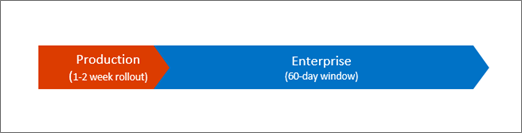
By default, all OneDrive clients install using the Production Ring, regardless of whether OneDrive is configured for personal or business use. A Production Ring release and its associated features are generally available globally.
The OneDrive Enterprise Ring is available but must be configured via group policy. Enterprise Rings are slower than Production Rings to release features. New features show up for enterprises 60 days after the Production Ring release.
Office 365 ProPlus
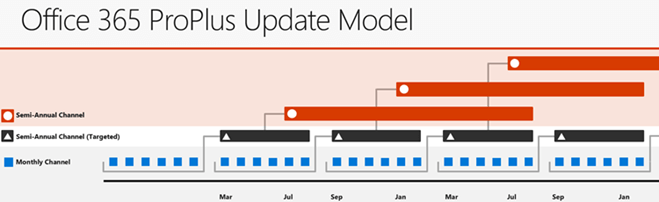
Finally, Office 365 ProPlus is such a moving target that you never know what update channels are to be used. As of September 2017, there were three new update channels: Office Monthly enterprise channel, Semi-Annual (Targeted) and Semi-Annual channels.
These Semi-Annual channels are intended to mirror the Windows 10 serving release channels. They're also intended for customers whose tenants are configured for Standard Release, not necessarily First Release.
The Office Monthly Channel is intended for those who wish to receive the latest features immediately when they become available. Monthly Channel also allows customers to perform any necessary testing of new features prior to general deployment. And the Monthly Channel feature release should (but doesn't necessarily) coincide with features release for Office 365 tenants configured for rirst release.
As for Windows 10 servicing release channels, I’m not going into detail these for now except to list them here for general reference. I’ll have more on Windows 10 and other updates in a future post.
| Windows 10 Edition | Semi-Annual Channel
(Targeted)
| Semi-Annual Channel | Long-Term Servicing
Channel
| Insider Program |
|---|---|---|---|---|
| Home | Y | N | N | Y |
| Pro | Y | Y | N | Y |
| Enterprise | Y | Y | N | Y |
| Enterprise LTSB | N | N | Y | N |
| Pro Education | Y | Y | N | Y |
| Education | Y | Y | N | Y |
| Mobile | Y | N | N | Y |
| Mobile Enterprise | Y | Y | N | Y |

Aubrey Marshall
Former Business Productivity Consultant (2018–2021), Insight
Aubrey was a managing consultant in the business productivity practice of Insight's Charlotte office.
 Monthly perspectives from global tech leaders.