Article Bring Your Own Device (BYOD) Security: What You Need to Know
As the talented Dolly Parton once sang, “workin’ 9 to 5” used to be the repetitive norm for businesses. Back then, desktops were large, bulky and immovable. But now, the Bring Your Own Device (BYOD) movement is taking over the workplace — adding fluidity to schedules by giving employees the ability to work anytime and anywhere.
By Isabel Ticlo / 1 Mar 2017 / Topics: Mobility , Modern workplace , Microsoft Azure , Cybersecurity

According to the Forrester Report, Best Practices For Securing And Empowering A Mobile Workforce, traditional work procedures are being disrupted by the rise of millennials in the workforce, increasing employee demand for technology flexibility and a focus on the employee experience. While mobility leads to greater collaboration, communication and productivity, it’s also changing the way small businesses approach security.
Balancing BYOD security risks and BYOD rewards
When it comes to our personal devices, we’re quick to use them to sign in to everything from email accounts to banking profiles — while also giving applications permission to grant access to third-party sites when prompted to do so. Smartphones, tablets and laptops are our constant companions, but what happens when we bring them into professional work environments? Our personal devices can become gateways to crucial company information.
Devices are now an alarm clock, health tracker, web browser, email client and music player. And they’re distracting, especially at the office. So how can we minimize the interruptions from our phones to increase productivity at work? Here are a few tips:
- Turn off notifications — That newsflash or social post is probably completely unrelated to your work. If you’re an iPhone user, you can also use the built-in Do Not Disturb feature to control who, if anyone, can reach you during the day.
- Delete your biggest time-sinks — Remove the apps that make you lose time. If you can’t bear to do that, move them off your home screen or hide them in folders so they aren’t staring at you any time you do need to use your phone. Like they say —out of sight, out of mind.
- Use a No Second Screen policy for meetings — Don’t just silence your phone, but also turn it screen-side down during meetings, whether online or in person, to help you remain focused on the task at hand.
Area 3: Effectively manage inbox emails.
It’s possible that you’re just now feeling caught up with the email you received over the holidays. Or maybe you’ll never really feel that way — the struggle is real. Having an email organization strategy and a few email management tips can be a lifesaver when you’re getting back to the office after a few well-deserved days off:
- Select times — Save your highest-energy times for getting your bigger projects done. If you’re just not a morning person, go through your inbox for the first 30 minutes to get settled into work mode. An email reply schedule such as early morning, just before lunch and before you leave for the day may work well for you.
- Use rules — Most email programs will categorize your emails into separate folders automatically using rules. Creating too many may be a detriment, but a few broad categories can help filter out the newsletters and non-critical email we’re all subject to.
- Quality over quantity — Take extra time to clearly articulate the answer to a question or to ask for more information. Being accurate in your writing should prevent additional clarification emails.
- Respond to the newest first — It may be tempting to start with the emails that have waited the longest for a response, but if you’ve been out for a week, chances are those requests were already handled.
- To maintain your current inbox status, you may be interested in the “Yesterbox” method endorsed by Zappos’ Tony Hsieh, in which the premise is to focus on anything that came in yesterday, leaving everything from today or from before yesterday to another time.
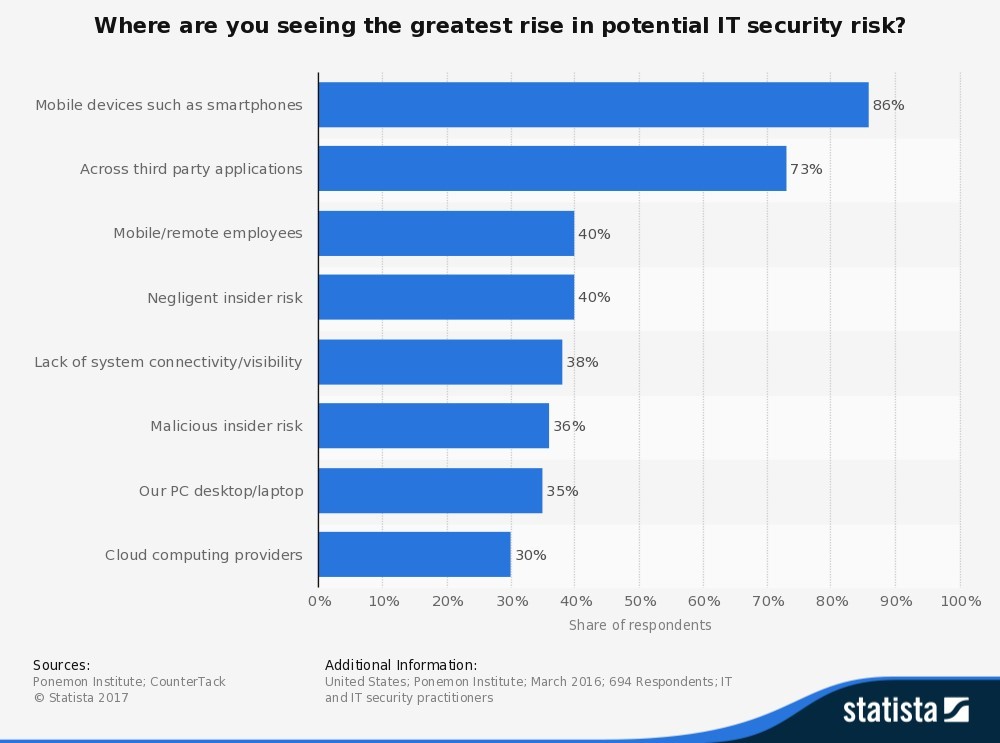
Figure 1 identifies areas where the IT security respondents saw the greatest rise in potential IT security risks: 86% said mobile devices, 73% said third-party applications, 40% said mobile and remote employees, 38% said negligent insider risk, 36% said lack of system connectivity or visibility, 35% said their PC desktops and laptops, and 30% said cloud computing providers.
In spite of the risks associated with endpoint devices, companies need BYOD policies to stay competitive in today’s growing market.
In order to give your team the fast, reliable and flexible work environment they need to help your business grow, mobility is a must. With the right controls and management practices integrated into your small business security strategy, you can leverage BYOD to increase efficiency, reduce company device costs, and create better employee and customer experiences.
Creating a mobile device management and BYOD security solution
The first step in developing a proper mobile strategy is to evaluate your current state of business. Ask yourself the following questions:
- Which teammates deal with critical, sensitive data?
- What devices will be permitted for work use?
- What software solution will you need to secure cloud application access?
- What additional tools can you set up for backup and recovery?
- What restrictions need to be put in place?
Forrester has created a risk continuum to guide BYOD security decision-making. It suggests that employees who fall into the low-risk profile and need basic applications to complete everyday assignments can jump in with open access and little or no security, controls or restrictions. Those who have a high-risk profile and deal with critical company data, customer information and employee credentials need to be restricted to corporate devices. Those in between are eligible to access personal devices with security controls in place to make sure applications, browsers and documents are secure.
It’s important to note that successful BYOD security policies must be adaptable since they fluctuate according to changing teammate job functions, work requirements and technology. According to the Forrester report, when businesses look for tools to better manage security around devices, many companies:
- Use containers to separate corporate and personal apps and content.
- Secure productivity apps for content and notes.
- Secure browsers for cloud and corporate data access.
- Customize network access controls for secure connectivity.
Mobility isn’t slowing down — neither should you.
The hit single “9 to 5” was released in 1980, when workers were tethered to their desks. Today, smartphones and laptops are basic accessories, enabling employees to complete their tasks whenever and wherever they choose.
Don’t let security concerns deter you from enabling greater flexibility and mobility for your business. Start by addressing your core business needs and develop a BYOD program that fits your objectives. Once you have a solid practice in place, continue to provide training and support to help your teammates manage and use their devices effectively.
As a result, your business will save money, increase productivity and boosts employee satisfaction.


.png)