Blog Where Should Analytical Versus Transactional Data Live Inside Databricks?
By John Miner / 14 Jul 2026 / Topics: Artificial Intelligence (AI) , Application development , Cloud , Analytics

Key takeaways
- Transactional and analytical workloads have different access patterns, so they need different Databricks technologies.
- Use Databricks Lakebase for low-latency transactional workloads that require frequent inserts, updates, deletes, and lookups.
- Use Databricks Lakehouse for large-scale analytics, reporting, dashboards, data engineering, machine learning, and AI workloads.
- Delta Lake, SQL Warehouse, and Photon strengthen Databricks’ analytical capabilities by improving reliability, usability, and query performance.
- New Databricks capabilities such as Lakehouse//RT and LTAP point toward a more unified future for transactional and analytical data.
When choosing which Databricks technology to deploy for your workloads, it is critical to understand the different access and storage patterns between transactional and analytical data.
What’s the difference? Take a retail business for example. A point-of-sale system needs to write a sale quickly, update inventory, and return a response in milliseconds. That is transactional processing. Later, the same business may want to summarize sales across stores, compare regions, or analyze buying trends over time. That is analytical processing.
Both workloads involve business data, but they are not the same kind of work. Inside Databricks, that distinction matters.
Databricks is a unified data and AI platform used by data engineers, analysts, data scientists, and application developers to process, manage, analyze, and govern enterprise data. It started with large-scale data processing and analytics, and it has continued to expand into a broader platform for lakehouse, warehouse, AI, and now transactional database workloads.
Typically, transactional systems, also known as Online Transaction Processing (OLTP) systems, support high volumes of insert, update, and delete statements with millisecond execution times. Single retrieval of data using a select statement depends on indexing.
Analytical systems, also known as Online Analytical Processing (OLAP) systems, support large-scale Data Manipulation Language (DML) statements with longer execution times. These systems are often used for reporting, dashboards, data engineering, machine learning, and AI.
To understand where these workloads belong in Databricks, it helps to look at how the platform has evolved.
Databricks and Apache Spark
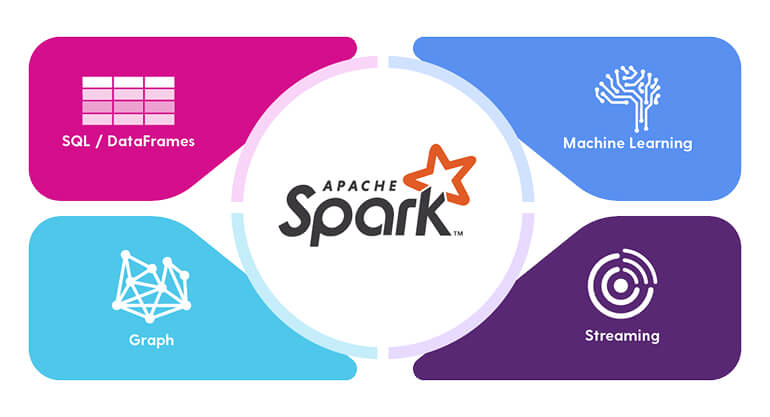
The founders of Databricks started the company in 2013 after creating Apache Spark. Spark, written primarily in Scala, is an in-memory distributed processing engine. It was a notable improvement over Hadoop because it could deliver quicker execution times for many large-scale data processing workloads.
In very simple terms, the computer’s memory is faster than disk storage.
The key concept behind Spark data processing is the Resilient Distributed Dataset (RDD). This immutable data structure is fault tolerant, provides consistency and performance, and allows for lazy execution of operations.
There were two problems with the original RDD syntax.
First, it was very low-level coding. Developers had to work close to the execution model, which made Spark powerful but not always easy to use.
PySpark helped solve this problem by allowing developers to abstract these calls using DataFrames within Python. Databricks also supports SQL syntax within the notebook editor. The Catalyst Optimizer can convert SQL, Python DataFrames, or Scala datasets into an execution plan — a directed acyclic graph — using RDDs underneath.
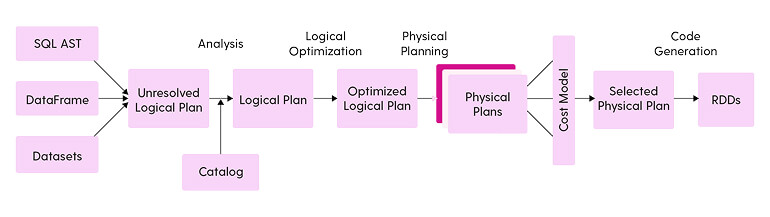
This made Spark more approachable for a wider set of data professionals. Engineers could use Python. Analysts could use SQL. The engine could still optimize the work for distributed processing.
The second problem was how to manipulate Spark catalog tables while preserving Atomic, Consistent, Isolated, and Durable (ACID) properties.
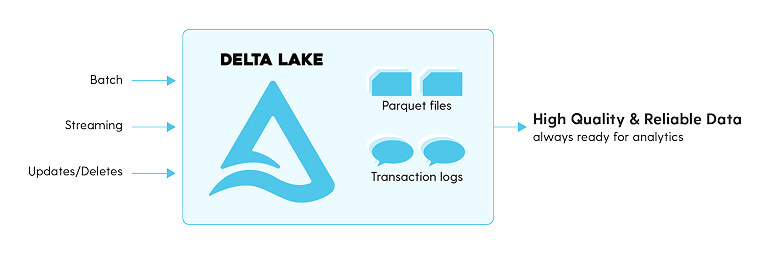
Databricks solved this by introducing the Delta file format in 2017. Delta Lake brings ACID transactions, schema enforcement, and time-travel capabilities to standard cloud data lakes. This was a major step toward the Lakehouse architecture used today. Data lakes were already storing large volumes of data; Delta Lake made them more reliable for enterprise analytics.
Databricks SQL Warehouse
Until December 2021, Databricks did not offer a full data warehouse solution. That meant clusters had to be spun up using the client’s own computing resources.
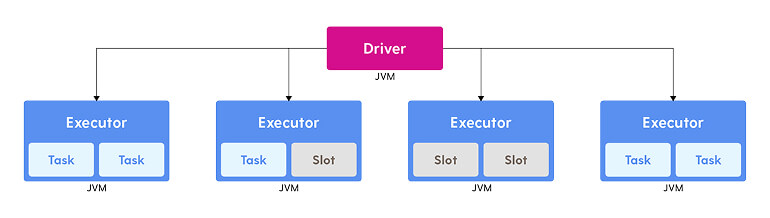
A typical cluster has a single driver and multiple executors. Users had to manage the size of the nodes as well as the packages loaded onto those nodes. Additionally, if someone forgot to turn off a cluster in a lower environment, the monthly cost could increase.
The introduction of Databricks SQL added several key features for analytical workloads.
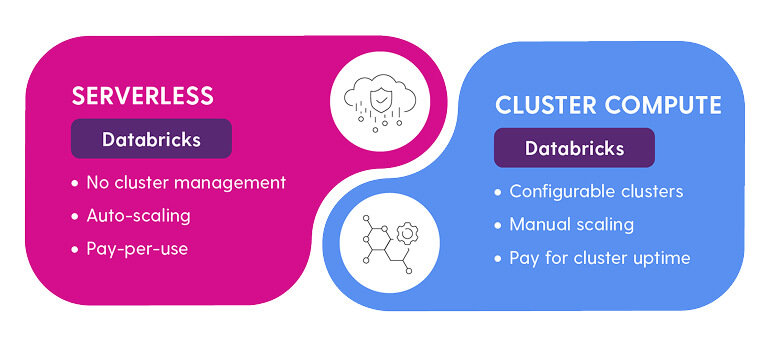
One was the evolution toward serverless computing. In the traditional cluster model, startup could take several minutes. With serverless compute, Databricks handles more of the underlying infrastructure, and users can start working faster without managing as much cluster configuration themselves.
This matters for analytical users. Business analysts, dashboard users, and SQL developers generally want to run queries, explore data, and build reports. They do not want to spend time sizing clusters, managing packages, or worrying about idle compute.
Photon and faster analytical processing
The execution of Spark code has historically depended on the JVM-based Spark SQL execution engine. Photon improves performance by replacing that execution path with a native C++ runtime.
The Apache Spark query optimizer, Catalyst, still plans the query. Photon takes over at the execution layer, processing data in columnar batches rather than row by row. When Photon encounters an unsupported operation during query execution, it can transparently fall back to the Spark runtime for the remainder of that operation.
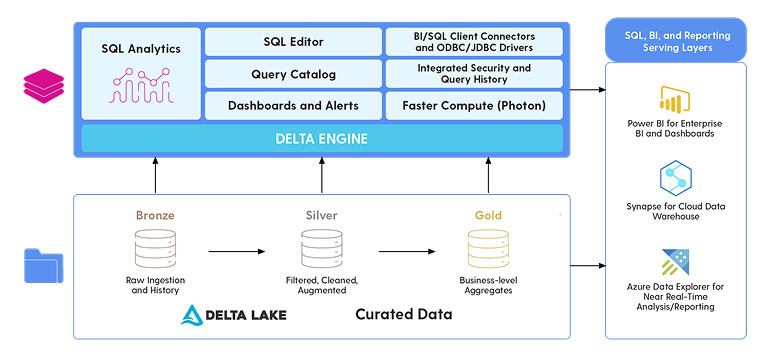
This gives Databricks a more complete analytical story.
Data engineering can process data from one quality zone to another in a medallion architecture. Ad hoc queries can be executed through the SQL editor. Standardized dashboards can give end users insight into the Delta Lake.
An important aspect of Databricks SQL Warehouse is the ability to alert when certain conditions happen. For instance, a retailer may want an alert when the total amount of sales is zero at a given store. That could indicate a system issue, a data pipeline issue, or a business event that needs investigation.
So far, both Databricks Spark and Databricks SQL Warehouse can process OLAP data. The question is: How can we place OLTP data within the same cloud service?
Lakebase and transactional processing
Databricks wanted to use an open-source database that was well-documented so AI agents could be used during coding. This is one reason PostgreSQL is foundational to the Lakebase story.
In 2026, Databricks Lakebase became generally available. Lakebase is a PostgreSQL-compatible transactional database service inside Databricks. It uses the concept of splitting processing into two components: shared storage and serverless compute.
Of course, the serverless computing can turn off when people are not using the database.
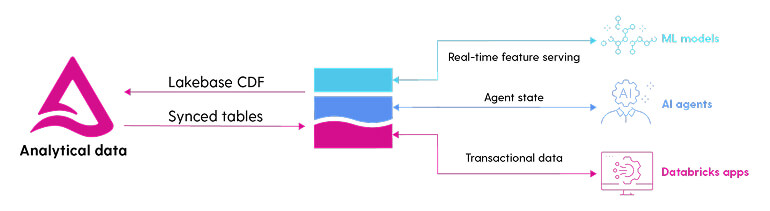
Lakebase adds an operational database pattern to Databricks. This is different from using Spark or SQL Warehouse for analytics. Lakebase is meant for transactional workloads, where applications need to write, update, delete, and retrieve data with low latency.
Data can be synchronized between the Lakehouse and Lakebase. This gives organizations a path to support both transactional applications and analytical reporting within the Databricks ecosystem.
Lakebase includes features such as autoscaling, branching, instant restore, high availability, read replicas, and scale to zero.
My favorite feature is branching.
If someone wants a zero-copy instance of the database, we can create a branch. Instead of making a full duplicate of the database, the branch can act as a pointer to the current database state until changes are made. This is useful for development, testing, and experimentation because teams can work with realistic data without creating another full copy.
This technology completes the transaction processing story. We now have an open-source database in which business applications can write data. That data can then be synchronized between Lakehouse and Lakebase for analytical reporting.
Choosing between Lakebase and Lakehouse
The workload should drive the decision. If you have a high volume of data manipulation statements that need to be executed with low latency, use Lakebase.
If your dataset is extremely large and you need to summarize it for analytics, use the existing Lakehouse design with declarative pipelines and/or PySpark DataFrames.
A business application writing orders, updating account records, or recording transactions should use Lakebase. A reporting system summarizing sales by month, store, or region should use the Lakehouse. A data engineering pipeline moving data through bronze, silver, and gold quality zones should use the Lakehouse. A machine learning or AI workload that depends on large-scale historical data should also use the Lakehouse.
The point is that transactional and analytical systems are designed for different access patterns. Databricks now has technologies that support both.
What changed at the Databricks Data + AI Summit 2026
I recently came back from the Databricks Data + AI Summit 2026, held in June in San Francisco. There were two major announcements that might change which components you use in the future.
The first announcement was Databricks’ new real-time lakehouse, Lakehouse//RT. The engineers at Databricks went back to the drawing board for this engine because it can handle amazing amounts of queries per second.
This is vital for workloads that need analytical context but also require very fast query performance. Operational dashboards, observability, customer-facing analytics, and fraud detection are all examples of workloads that can benefit from lower latency and high concurrency.
The second announcement is the new Lake Transactional/Analytical Processing (LTAP). Lakebase and Lakehouse already shared a storage layer, but each maintained its own copy of the data in its own format. This new feature allows Lakebase to store directly in Unity Catalog, which eliminates the need for separate pipelines and synchronization of data.
This could be a major change in future Databricks architecture. If transactional and analytical workloads can work from the same governed foundation, organizations can reduce data movement, simplify architecture, and make data available faster for reporting, AI, and application development.
That is where architectural planning matters. The right design can reduce unnecessary data movement, simplify governance, improve performance, and give teams a cleaner path from operational data to analytics and AI.
Evaluate Databricks in the context of your data estate and AI roadmap. Insight helps you put the right data in the right place for the right workload.
About the Authors:

John Miner
Data Architect, Insight
John is a data architect focused on digital innovation. He helps organizations solve business challenges with data platform solutions. He has more than 35 years of data processing experience, with architecture expertise across the software project lifecycle — including system design, development, implementation, and maintenance. John holds undergraduate and graduate degrees in computer science from the University of Rhode Island, along with multiple Microsoft certifications in database administration, system administration, data management and analytics, and data science.
 Monthly perspectives from global tech leaders.